Execution Procedure
This chapter describes how ProSort executes operations.
1. SORT and COPY Operations
ProSort executes SORT and COPY operations as follows:
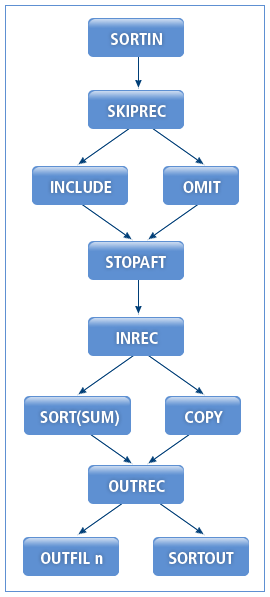
The following are the steps for executing SORT and COPY operations.
-
SKIPREC
Specifies the number of records to skip before performing the sort operation.
The following skips the first 5 records and gets from the 6th record as input.
SKIPREC = 5
-
Includes or omits records that meet a specific condition.
Option Description INCLUDE
Includes only the records that meet a specific condition.
OMIT
Omits records that meet a specific condition.
The condition is a relational expression that combines multiple expressions by using logical operators. The following relational expressions are available.
Relational Expression Description Comparison
Compares a field with another field or a constant.
String comparison
Compares strings.
Bitwise operation
Operates on one or two binary numbers at the level of their individual bits.
Date comparison
Compares dates.
The following relational expression compares two fields: one with the f1 format that begins at the p1-st byte in a record and is m1 byte long, and another with the f2 format that begins at the p2-nd byte and is m2 bytes long.
p1, m1, f1, {EQ|NE|GT|GE|LT|LE}, p2, m2, f2The following operators are available.
Operator Relationship EQ
Equal to
NE
Not equal to
GT
Greater than
GE
Greater than or equal to
LT
Less than
LE
Less than or equal to
The following includes only the records that meet the following condition: an 8-byte floating-point number at byte 5 that is greater than an 8-byte floating-point number at byte 13, or a 4-byte floating-point number at byte 105 that is less than or equal to the constant, 1000.
INCLUDE COND=(5,8,GT,13,8,|,105,4,LE,1000),FORMAT=CSF
-
STOPAFT
Gets input records until the number of records reaches the specified number.
The following passes 1000 records to the next step.
STOPAFT = 1000
-
Reformats input records into new records with a specified format. The new records may consist of parts of the input records specified with constants or (p,m) and converted input fields specified with (p,m,f,to).
After INREC is performed, reformatted records are processed.
The following reformats each input record into a new record that consists of bytes 10 through 13 of the input record, followed by bytes 20 through 27, followed by bytes 33 through 43, followed by the byte 5.
INREC FIELDS=(10,3,20,8,33,11,5,1)
The following reformats each input record into a new record that consists of bytes 20 through 23 of the input record, followed by bytes 12 through 14.
INREC FIELDS=(20,4,12,3)
SORT FIELDS=(1,4,D,5,3,D),FORMAT=CH
-
SORT(SUM), COPY
Sorts records based on a key field, which is specified with p, m, f, and s.
Item Description p
Position in bytes and bits.
-
If set to 4, the field begins on the 4th byte of each record.
-
If set to 4.2, the field begins on the 2nd bit of the 4th byte of each record.
m
Length in bytes and bits.
f
Format.
s
Either A (ascending order) or D (descending order).
If INREC was used, the position is determined according to the reformatted records.
Specifying the EQUALS option performs stable sort which guarantees that records with the same key field are sorted in the original order. Specifying the SUM option sums specified fields in records with the same key. If no field is specified, only duplicate records are eliminated.
The following sorts records based on 5-byte floating-point numbers at byte 2 in ascending order.
SORT FIELDS=(2,5,FS,A)
The following sorts records based on 4-byte Zoned Decimal (ZD) fields at byte 7025 and 8-byte ZD fields at byte 5048 in ascending order.
SORT FILEDS=(7025,4,ZD,A,5048,8,ZD,A),EQUALS
The following copies records without sorting.
SORT FILEDS=(COPY)
The following sums 8-byte Packed Decimal (PD) fields at byte 21 and 4-byte FI fields at byte 11 of the sorted records with the same key field.
SUM FIELDS=(21,8,PD,11,4,FI)
-
-
OUTREC
Reformats the sorted records by using a specified format in the same way as in INREC. If INREC was used, the position is determined according to the reformatted records.
For more information, refer to 4. INREC in SORT and COPY Operations.
-
OUTFIL
Refer to OUTFIL Operation.
2. MERGE Operation
The MERGE operation merges multiple sorted input files and outputs newly sorted records. It is performed in the same order as in the SORT operation except for the SKIPREC and STOPAFT options.
ProSort executes MERGE operations as follows:
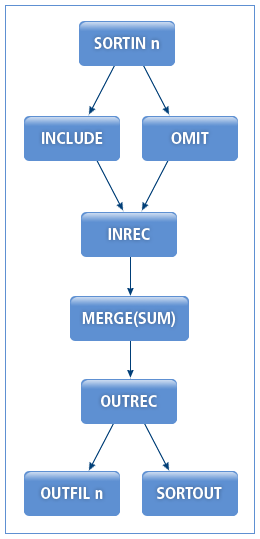
The following are the steps for executing MERGE operations.
-
INCLUDE, OMIT
Refer to 2. INCLUDE, OMIT in SORT and COPY Operations.
-
INREC
Refer to 4. INREC in SORT and COPY Operations.
-
MERGE(SUM)
Merges multiple input files based on a given field key. For the correct operation, the input files' field keys must be sorted. Fields and options are defined in the same way as in the SORT operation.
The following merges input files in ascending order by using 4-byte ZD fields at byte 25 and 8-byte ZD fields at byte 48 as field keys.
MERGE FIELDS=(25,4,A,48,8,A),FORMAT=ZD
-
OUTREC
Reformats the merged records by using a specified format in the same way as in INREC. If INREC was used, the position is determined according to reformatted records.
Refer to 4. INREC in SORT and COPY Operations.
-
OUTFIL
Refer to OUTFIL Operation.
3. OUTFIL Operation
The OUTFIL operation outputs new records created by applying a condition to records resulted from a SORT, MERGE, or COPY operation.
ProSort executes OUTFIL operations as follows:
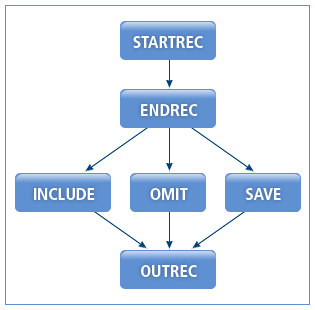
The following are the steps for executing OUTFIL operations.
-
STARTREC
Starts the execution from the specified record.
-
ENDREC
Ends the execution at the specified record.
-
INCLUDE, OMIT, SAVE
Includes or omits records that meet a specific condition. The SAVE option includes records that are not included by other OUTFIL.
The following checks a string in bytes 8 through 13 of each record and then outputs records to the file GP1 if the string is ACCTNG or to the file GP2 if the string is DVPMNT.
OUTFIL INCLUDE=(8,6,CH,EQ,C’ACCTNG’),FNAMES=GP1
OUTFIL INCLUDE=(8,6,CH,EQ,C’DVPMNT’),FNAMES=GP2
OUTFIL SAVE,FNAMES=NOT1OR2
-
OUTREC
Reformats output records by using a specified format.
4. User Exit Function
Functions can be registered as User Exit Function by using ProSort scripts or APIs. They are used to insert, convert, and delete records during SORT, MERGE, and COPY operations.
User Exit Function modifies records received from the previous step and then passes them to the next step. After the last record is passed, NULLs are passed to the function.
SORT, MERGE, and COPY operations work only when records are directly entered through ProSort APIs. If records are entered through a file, the operations do not work.
The details of User Exit Function are as follows:
-
Prototype
int user_exit_func (void *rec_addr, int rec_len, int input_no, void **ret_rec_addr, int *ret_rec_len); -
Parameter
Parameter Use Description *rec_addr
Input
Pointer to the record address passed from the previous step.
rec_len
Input
Record length passed from the previous step.
input_no
Input
SORTIN number. Can only be used for User Exit Function E32 of a MERGE operation.
**ret_rec_addr
Output
Pointer to the converted or added record address.
*ret_rec_len
Output
Pointer to the converted or added record length.
-
Return value
Return Value Description 0
No Action.
The next step is processed without a record change. The received *rec_addr and rec_len values are passed with **ret_rec_addr and *ret_rec_len.
4
Delete Record. The record is deleted and cannot be passed to the next step.
8
Do Not Return. User Exit Function is not used from the next record.
12
Insert Record. A received record is added. The added record is processed by the User Exit Function before it is passed to the next step. Existing records are processed after the added record is passed to the next step.
16
Terminate ProSort. ProSort is terminated and all processing jobs end.
20
Record Altered.
The next step is processed with a changed record. The received *rec_addr, rec_len, and input_no are used to change the record, and then the changed record information is passed with **ret_rec_addr and *ret_rec_len.
|
For more information about how to register functions by using ProSort scripts and APIs, refer to MODS and ProSort API Functions respectively. |
4.1. SORT and COPY Operations Including User Exit Function
ProSort executes SORT and COPY operations including User Exit Function as follows:
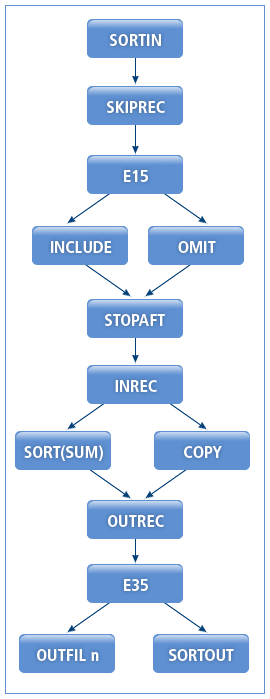
In SORT and COPY operations, an input record can be modified by registering User Exit Function E15. User Exit Function E35 can modify records after performing OUTREC.
4.2. MERGE Operations that Include User Exit Function
ProSort executes MERGE operations that include User Exit Function as follows:
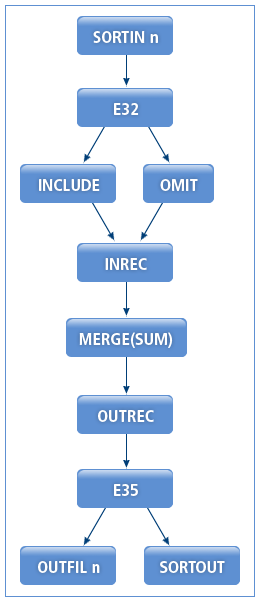
In MERGE operations, an input record can be modified by registering User Exit Function E32. User Exit Function E35 can modify records after performing OUTREC.
4.3. User Exit Function Examples
The following describes User Exit Function examples.
Passing All Records
The following shows a function that passes all records as they are received.
static int
exit_none(const void *rec_addr,
          const int rec_len,
          int file_no,
          void **ret_rec_addr,
          int *ret_rec_len)
{
    if (rec_addr == NULL)
        return 8; /* do not return */

    *ret_rec_addr = (void *) rec_addr;
    *ret_rec_len = rec_len;

    return 0; /* no action */
}
Deleting All Records
The following shows a function that deletes all records.
static int
exit_delete(const void *rec_addr,
           const int rec_len,
           int file_no,
           void **ret_rec_addr,
           int *ret_rec_len)
{
    if (rec_addr == NULL)
        return 8; /* do not return */

    return 4;
}
Adding All Records
The following shows a function that copies and adds all records. If the record a, b, and c are passed from the previous step, the record a, a, b, b, c, and c will be passed to the next step.
static int
exit_insert(const void *rec_addr,
            const int rec_len,
            int file_no,
            void **ret_rec_addr,
            int *ret_rec_len)
{
    static char buf[REC_LEN];
    static int inserted = 0;

    /* Added records are not modified. */
    if (inserted) {
        inserted = 0;
        *ret_rec_addr = (void *) rec_addr;
        *ret_rec_len = rec_len;
        return 0; /* no action */
    }

    if (rec_addr == NULL)
        return 8; /* do not return */

    memcpy (buf, rec_addr, REC_LEN);

    *ret_rec_addr = buf;
    *ret_rec_len = rec_len;

    inserted = 1;

    return 12; /* insert record */
}
Adding the Last Record
The following shows a function that adds the last record 3 times. If the record a, b, and c are passed from the previous step, the record a, b, c, c, c, and c will be passed to the next step.
static int
exit_insert_to_end(const void *rec_addr,
                  const int rec_len,
                  int file_no,
                  void **ret_rec_addr,
                  int *ret_rec_len)
{
    static char buf[256];
    static int buf_rec_len;
    static insert_cnt = 0;

    if (rec_addr != NULL) {
        memcpy(buf, rec_addr, rec_len);
        buf_rec_len = rec_len;

        *ret_rec_addr = buf;
        *ret_rec_len = buf_rec_len;

        return 0; /* do not action */
    }

    if (insert_cnt >= 3)  /* Up to 3 records are added. */
        return 8; /* do not return */

    *ret_rec_addr = buf;
    *ret_rec_len = buf_rec_len;
    insert_cnt++;

    return 12; /* insert record */
}