1. WAIT Command
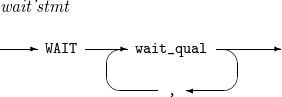
Suspends execution of a script until a specified event is raised. If the event is also specified the EVENT command, the WAIT command suspends executing the script from the monitoring start time until the event is raised.
If the event is not specified by the EVENT command, the WAIT command immediately suspends executing the script from until the event is raised. In this case, the command suspends execution as if it were immediately preceded by the EVENT command with STACK(NO) specified.
The WAIT command lists the event occurrence history saved in a stack. If you registered the event with STACK(YES) specified in the EVENT command, the WAIT command retrieves information about the event occurrence from the stack. If you registered the event with STACK(NO) specified in the EVENT command, the WAIT command simply lists the event occurrence.
When an event occurrence is retrieved or listed, information about the event is saved as control variables such as &SYS#EVENT. For more information about control variable, refer to Command Procedures.
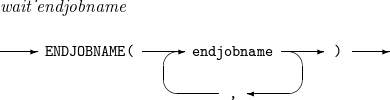
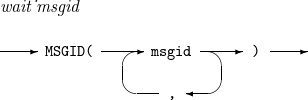
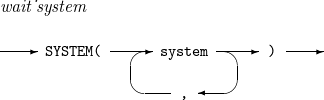
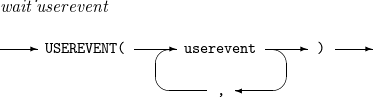
Syntax
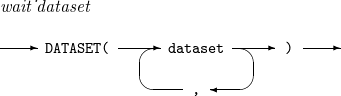
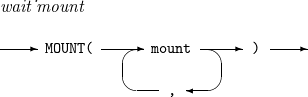
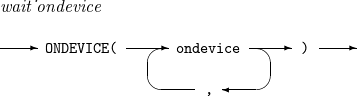
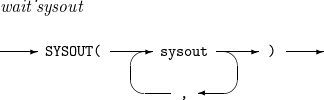
| Item | Description |
|---|---|
time |
Time in the hh.mm format.
|
date |
Date. For syntax check only. |
week |
Day of the week. For syntax check only. |
message |
Message string to identify a message. The string identifies the message if the string matches the beginning bytes of the message. If this string is in the format '%.string', the string identifies the message if the string matches the middle bytes of the message. |
dspmessage |
Message string to display on the event wait status screen. For syntax check only. |
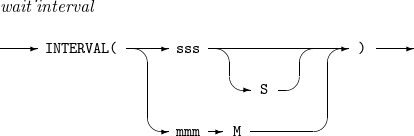
sss |
Wait time in seconds. |
mmm |
Wait time in minutes. |
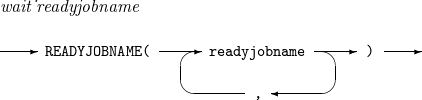
readyjobname |
Name of a job. For syntax check only. |
endjobname |
Name of a job. |
msgid |
Identifier of a message. |
system |
System event. For syntax check only. |
userevent |
User event. For syntax check only. |
dataset |
Data set. For syntax check only. |
mount |
Volume. For syntax check only. |
ondevice |
Floppy disk. For syntax check only. |
sysout |
System output. For syntax check only. |
Operands
The following table describes the operands mentioned previously.
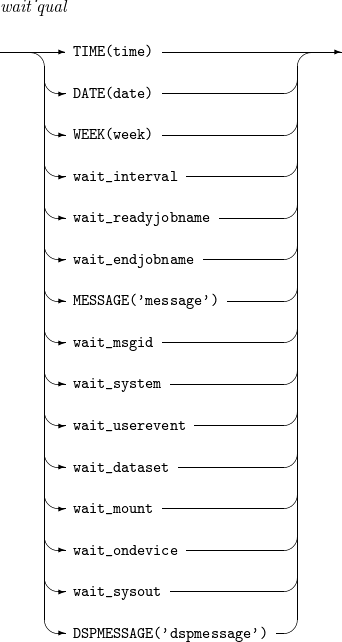
| Operand | Description |
|---|---|
TIME |
Suspends execution until the specified time. |
DATE |
Suspends execution until the specified date. For syntax check only. |
WEEK |
Suspends execution until the specified day. For syntax check only. |
MESSAGE |
Suspends execution until the specified message is displayed. |
DSPMESSAGE |
Specifies the message to be displayed on the event wait status screen. For syntax check only. |
INTERVAL |
Suspends execution during the specified time interval. |
READYJOBNAME |
Suspends execution until the specified job starts. For syntax check only. |
ENDJOBNAME (END) |
Suspends execution until the specified job ends. |
MSGID |
Suspends execution until a message with the specified identifier is displayed. |
SYSTEM |
Suspends execution until the specified system event occurs. For syntax check only. |
USEREVENT |
Suspends execution until the specified user event occurs. For syntax check only. |
DATASET |
Suspends execution until the specified data set is created. For syntax check only. |
MOUNT |
Suspends execution until the specified volume is mounted. For syntax check only. |
ONDEVICE |
Suspends execution until the specified floppy disk is ready. For syntax check only. |
SYSOUT |
Suspends execution until printing the specified output completes. For syntax check only. |
Example
The following example uses the WAIT command.
WAIT MSGID(XDX1000I) INTERVAL(5S)