1. PRINTOFF Command
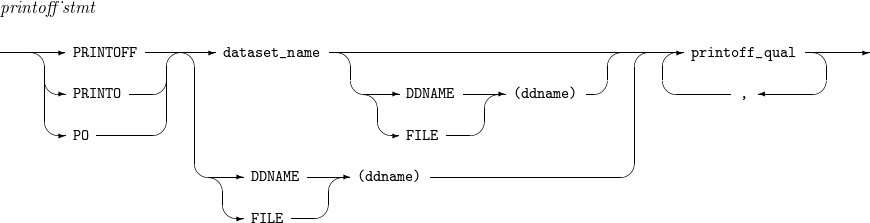
Allocates a data set for SYSOUT, copies the contents of the data set to the SYSOUT data set, and prints it to the printer. At this time, if the data set to be output is not allocated in advance, it allocates directly.
Syntax
| Item | Description |
|---|---|
dataset_name |
Name of data set to output. |
ddname |
DD name of data set to output. |
unit-type |
Device to allocate data set. Only valid when VOLUME is specified. |
volser |
Serial number of the volume that contains data set. |
class |
Output class of SYSOUT data set. (Default value: A) |
destination |
Output destination of the SYSOUT data set. Only printer name of 1 to 8 characters is allowed. |
nnn(copies) |
Number of copies. (Default value: 1) |
form |
Format to use in printing. For syntax check only. (Default value: $TST) |
fcb |
Format control buffer to use in printing with 1 to 4 characters. |
image |
Image name to use in printing with 1 to 4 character. For syntax check only. |
nnn (linelength) |
Number of character in the line to output with 1 to 208 characters. (Default value: 132) |
nnn (pagelength) |
Number of lines of page to output with 1 to 120 lines. (Default value: 60) |
flash-name |
Name of form flash overlay. |
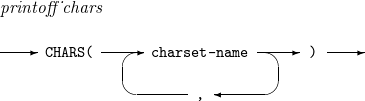
charset-name |
Name of character set to use in printing. |
progname |
Name of external writer to handle output. For syntax check only. |
font-name |
Font name to use in printing data set. For syntax check only. |
|
One of dataset_name and DDNAME (FILE) must be described, and if both are described, dataset_name must be described first. If only DDNAME (FILE) is described, the corresponding DD should be allocated. If both DDNAME (FILE) and dataset_name are described, check if it is the same as the dsname of the already allocated DD. |
Operands
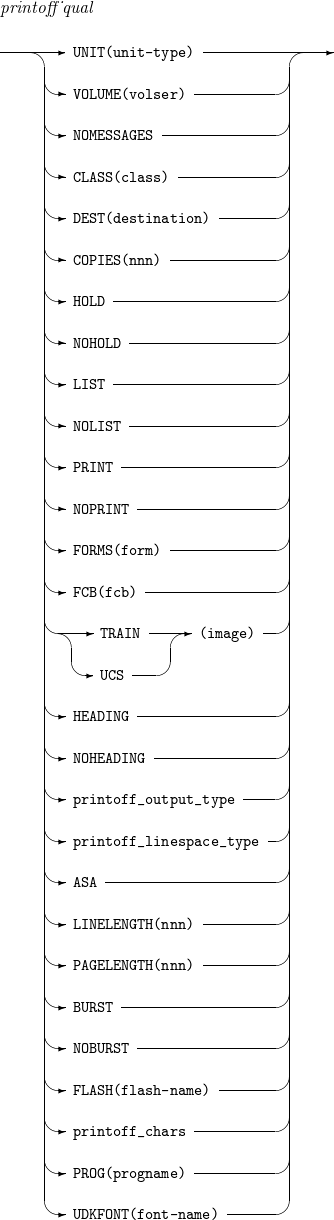
The following table describes the operands mentioned previously.
| Operand | Description |
|---|---|
UNIT |
Specifies the device to allocate data set. It is valid when VOLUME is specified. |
VOLUME |
Specifies serial number of volume that contains the data set. |
NOMESSAGES (NOMSGS) |
Specifies when user does not want to print non-error messages. |
CLASS |
Specifies output class of SYSOUT data set. |
DEST |
Specifies output destination of SYSOUT data set. |
COPIES |
Specifies the number of copy. |
HOLD |
Registers in the output pending queue when the data set is released. For syntax check only. |
NOHOLD |
Does not register to the output pending queue when the data set is released. For syntax check only. |
LIST |
Specifies output list of separately created processed member names when outputting data set. For syntax check only. |
NOLIST |
Specifies not to create output list of separately processed member names. For syntax check only. |
Specifies to output member names. For syntax check only. |
|
NOPRINT |
Specify not to output member names. For syntax check only. |
FORMS |
Specifies format to use in printing. For syntax check only. |
FCB |
Specifies the format control buffer to use in printing. |
TRAIN |
Specifies image name to use in printing. |
UCS |
Specifies image name to use in printing. |
HEADING |
Specifies to print the title including the data set name. For syntax check only. |
NOHEADING |
Specifies to print the title does not appear together. For syntax check only. |
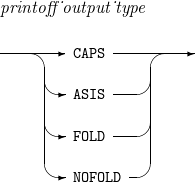
CAPS |
Specifies to print by converting to uppercase. |
ASIS |
Specifies to print without converting to uppercase. |
FOLD |
Specifies to print by converting to uppercase. Synonym with CAPS. |
NOFOLD |
Specifies to print without converting to uppercase. Synonym with ASIS. |
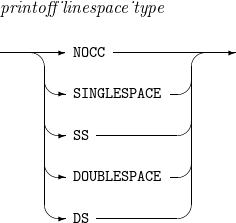
NOCC |
Specify to print with a single interval. For syntax check only. |
SINGLESPACE (SS) |
Specify to print with a single interval. Synonym with NOCC. For syntax check only. |
DOUBLESPACE (DS) |
Specify to print with a dual interval. For syntax check only. |
ASA |
Specifies to print the ASA control character in the first byte of each record of data set. |
LINELENGTH (LL) |
Specifies the number of characters in the line to print. |
PAGELENGTH (PL) |
Specifies the number of lines of the page to print. For syntax check only. |
BURST |
Specifies not to print in continuous form. For syntax check only. |
NOBURST |
Specifies to print in continuous form.For syntax check only. |
FLASH |
Specifies the name of form flash overlay |
CHARS |
Specifies the name of character set to use in printing. |
PROG |
Specifies the name of external writer to handle the output. For syntax check only. |
UDKFONT |
Specifies font name to use in printing data set. For syntax check only. |
Examples
The following example uses the PRINTOFF command to output the already allocated 'TEST.SDS.PRINTO' data set through the A output class.
ALLOC FI(TESTDS) DA('TEST.SDS.PRINTO') SHR KEEP
PRINTOFF 'TEST.SDS.PRINTO' CLASS(A)
FREE FI(TESTDS)
The following example uses the PRINTOFF command that allocates the 'TEST.SDS.PRINTO' data set directly and outputs it through the A output class. When the command is executed, the data set deallocation is also performed. Therefore, the operation is the same as the example mentioned previously.
PRINTOFF 'TEST.SDS.PRINTO' CLASS(A)