Cloud Environment Configuration
This appendix describes how to use JEUS in a cloud environment.
Overview
The following settings are required for the cloud server to function properly.
-
Among the Cloud Service Provider (CSP) files in the JEUS_HOME/lib/csp path, place the file appropriate for the cloud environment in the JEUS_HOME/lib/system path.
-
Place the JEUS cloud license in the JEUS_HOME/license path.
-
To group cloud servers into the same SCF group, configure one of the following:
-
Set the -Djeus.scf.group-id property to the same value.
-
Set the <id> value in the JEUS_HOME/domains/<DOMAIN_NAME>/config/domain.xml file to the same value.
-
For detailed settings for each cloud environment, refer to each section below .
Kubernetes
Kubernetes, an open-source platform for automated container management, is a resource offered by most PaaS clouds. This section describes how to set up OpenShift, a PaaS cloud based on Docker and Kubernetes, using it as an example.
Before configuring the environment to run JEUS on OpenShift, ensure that the following prerequisites are met.
The following are settings and examples for using JEUS on OpenShift (Kubernetes).
-
Run the master/node server.
-
Grant permission to use the master’s API server. (Refer to Kubernetes Documentation)
To share information between JEUS instances running in containers, the master API server is used. Because OpenShift (Kubernetes) accounts have limited access to the API server by default, appropriate permissions must be granted.
The following is an configuration file example. Save it with the .yaml extension.
clusterRoleExample.yaml//db-font-size 90%kind: ClusterRole apiVersion: rbac.authorization.k8s.io/v1 metadata: name: pod-reader rules: - apiGroups: [""] # "" indicates the core API group resources: ["*"] verbs: ["get", "watch", "list"]
clusterRoleBindingExample.yaml//db-font-size 90%kind: ClusterRoleBinding apiVersion: rbac.authorization.k8s.io/v1 metadata: name: read-pods subjects: - kind: Group name: system:serviceaccounts apiGroup: rbac.authorization.k8s.io roleRef: kind: ClusterRole name: pod-reader apiGroup: rbac.authorization.k8s.io
-
Set container environment variables to use the master’s API server. (Refer to Kubernetes Documentation)
The following is a configuration file example. Save it with the .yaml extension.
jeusContainerExample.yaml... spec: containers: - name: jeus-container env: - name: API_VERSION value: "v1" - name: KUBERNETES_NAMESPACE value: "default" ...JEUS uses the following container environment variables. These environment variables must be entered in the pod deployment file.
Environment Variable Description API_VERSION
Version of the master API server.
KUBERNETES_NAMESPACE
Namespace of the pod. This can be used to obtain information only about pods that have the same namespace.
-
Create (Deploy) a pod deployment file and check the pod status.
AWS
The AWS cloud supports both PaaS and IaaS clouds. When using JEUS in a PaaS cloud, you build the environment using EKS resources, a Kubernetes-based PaaS, and then start JEUS. This section describes how to configure a JEUS cloud server on EC2, which is an AWS IaaS resource.
|
For information on how to build an environment with EKS resources, refer to AWS Documentation, and for information on how to start JEUS, refer to the Kubernetes section. |
The JEUS cloud server operates based on EC2 information obtained from the AWS API, and the following setup process is required.
-
Grant appropriate permissions to IAM resource users to access EC2 resources. (Refer to AWS Documentation)
-
Issue an Access Key and Secret Key for the IAM resource user. (Refer to AWS Documentation)
-
Assign a tag with the key 'scfGroup' to the EC2 instance. Instances belonging to the same SCF group must have the same tag value. (Refer to AWS Documentation)
-
Set environment variables on the EC2 instances.
JEUS uses the following instance environment variables to utilize the AWS API server.
Environment Variable Description AWS_ACCESS_KEY
Access key granted from an IAM resource. It is required to generate a token for using the AWS API server.
AWS_SECRET_KEY
Secret key granted from an IAM resource. It is required to generate a token for using the AWS API server.
AWS_SCF_GROUP
Value for the scfGroup tag.
-
Check the EC2 resource startup and SCF grouping.
Central Session Server
This section describes an example of environment configuration to share sessions using JEUS Central Session Server in Kubernetes.
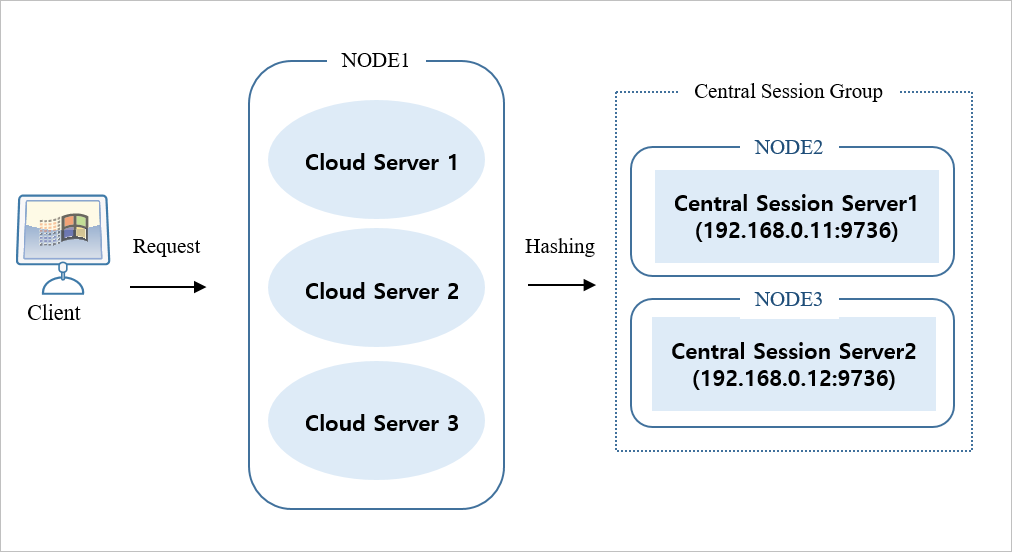
Central Session Server Configuration
-
Configuration Process
-
Create a central session server group with a primary and backup server setup. The primary and backup server information included in the group is specified based on 'IP:BASEPORT'.
<jeus-central-session-server-definition> <group> <name>Central_Session_Group</name> <servers> <server> <primary>192.168.0.11:9736</primary> <backup>192.168.0.12:9736</backup> </server> </servers> </group> </jeus-central-session-server-definition> -
The central session server section specifies the central session server group to which it belongs.
<servers>
    <server>
        <central-session-server>
            <group-name>Central_Session_Group</group-name>
        </central-session-server>
    </server>
</servers>
-
-
Configuration Example
The following are examples of configuarion in domain.xml used by the central session server.
domain.xml in NODE 2<domain> <servers> <server> <name>Central_Session_Server1</name> <listeners> <base>base</base> <listener> <name>base</name> <listen-address>192.168.0.11</listen-address> <!-- Internal IP of the Kubernetes Node --> <listen-port>9736</listen-port> <selectors>1</selectors> <use-dual-selector>false</use-dual-selector> <backlog>128</backlog> <read-timeout>30000</read-timeout> <reserved-thread-num>0</reserved-thread-num> </listener> </listeners> <central-session-server> <group-name>Central_Session_Group</group-name> </central-session-server> </server> </servers> <jeus-central-session-server-definition> <group> <name>Central_Session_Group</name> <servers> <server> <primary>192.168.0.11:9736</primary> <!-- Internal IP of the Kubernetes node --> <backup>192.168.0.12:9736</backup> <!-- Internal IP of the Kubernetes node --> </server> </servers> </group> </jeus-central-session-server-definition> </domain>domain.xml in NODE 3<domain> <servers> <server> <name>Central_Session_Server2</name> <listeners> <base>base</base> <listener> <name>base</name> <listen-address>192.168.0.12</listen-address> <!-- Internal IP of the Kubernetes Node --> <listen-port>9736</listen-port> <selectors>1</selectors> <use-dual-selector>false</use-dual-selector> <backlog>128</backlog> <read-timeout>30000</read-timeout> <reserved-thread-num>0</reserved-thread-num> </listener> </listeners> <central-session-server> <group-name>Central_Session_Group</group-name> </central-session-server> </server> </servers> <jeus-central-session-server-definition> <group> <name>Central_Session_Group</name> <servers> <server> <primary>192.168.0.11:9736</primary> <!-- Internal IP of the Kubernetes node --> <backup>192.168.0.12:9736</backup> <!-- Internal IP of the Kubernetes node --> </server> </servers> </group> </jeus-central-session-server-definition> </domain>-
The central session server is not configured as a scale-in or scale-out target.
-
The IP address of the central session server is set to the internal IP of the Kubernetes node.
-
The central session server group (jeus-central-session-server-definition) configuration must be applied consistently to both the cloud server and the central session server.
-
Cloud Server Configuration
-
Configuration Process
-
Configure a central session server group to be used by the service server (cloud server). The setting is the same as that in the central session server.
<jeus-central-session-server-definition> <group> <name>Central_Session_Group</name> <servers> <server> <primary>192.168.0.11:9736</primary> <backup>192.168.0.12:9736</backup> </server> </servers> </group> </jeus-central-session-server-definition> -
Set cluster-mode to DOMAIN_WIDE.
-
Set the session manager provider to 'CENTRAL' to use the JEUS central session server.
   <session-cluster>
        <session-storage>
            <session-manager-provider>CENTRAL</session-manager-provider>
            ...
        </session-strage>
    </session-cluster>
-
-
Configuration Example
The following is the example of configuration in domain.xml used by the cloud server.
NODE 1’s domain.xml<domain> <session-cluster> <cluster-mode>DOMAIN_WIDE</cluster-mode> <session-storage> <name>jeus-session-storage</name> <session-manager-provider>CENTRAL</session-manager-provider> <scope> <name>DOMAIN_WIDE</name> <session-config> <timeout>30</timeout> <max-session-count>-1</max-session-count> <reload-persistent>false</reload-persistent> <session-cookie> <cookie-name>JSESSIONID</cookie-name> <url-cookie-name>jsessionid</url-cookie-name> <version>0</version> <path>/</path> <max-age>-1</max-age> <secure>false</secure> <http-only>true</http-only> <same-site>Disable</same-site> <partitioned>false</partitioned> </session-cookie> </session-config> </scope> <central-session-manager> <group-name>Central_Session_Group</group-name> </central-session-manager> </session-storage> </session-cluster> <!-- Setting is the same as that in the central session server group --> <jeus-central-session-server-definition> <group> <name>Central_Session_Group</name> <servers> <server> <primary>192.168.0.11:9736</primary> <!-- Internal IP of the Kubernetes node for the central session server --> <backup>192.168.0.12:9736</backup> <!-- Internal IP of the Kubernetes node for the central session server --> </server> </servers> </group> </jeus-central-session-server-definition> </domain>-
The central session server group (jeus-central-session-server-definition) configuration must be applied consistently to both the cloud server and the central session server.
-
The session cluster mode is set to DOMAIN_WIDE, considering the cloud environment.
-