Introduction
This chapter introduces node managers and describes their common functions.
1. Overview
This section describes the basic concepts, purposes, types, and constraints of node managers.
1.1. Concepts
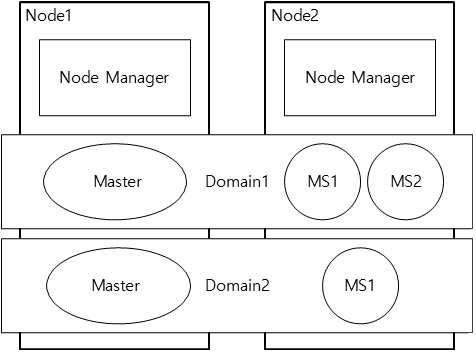
The servers that make up a domain can operate from multiple machines, and multiple domains can exist on a single machine. Only one JEUS instance can be installed on a machine, and a JEUS instance can only have one node manager. In this environment, a node manager manages server processes on the machine regardless of the domains. In other words, the node manager manages servers by machine instead of domain. It starts, terminates, or restarts the servers on a machine to provide services.
A JEUS that is installed on a machine is defined as a node. A node is defined as unique by using the address of the machine and the JEUS installation directory path.
The following shows the relationship between nodes, domains, and node managers.
1.2. Purpose
The main purpose of the node manager is to manage server processes that run on a node.
The node manager can start the servers on remote machines where Master Server (hereafter Master) is not running. The node manager can restart a server if the server is abnormally terminated or is in an abnormal state that you have defined. If a server suddenly shuts down, Master can detect this using System Clustering Framework (SCF) and restart it.
One instance of node manager exists per node. The instance can receive and apply a server patch. The servers managed by Master can be started using the console tool (jeusadmin) and start-server command through the node manager. In addition, the node manager manages external processes (currently RQS processes) as well as server processes by using a configuration file; it allows RQS processes to start, terminate, or restart when they were terminated abnormally. These operations are independent of a server process.
|
A node manager is an optional function that is not required of the server to provide services. However, it is recommended to use the node manager for stable operation of domains. |
1.3. Types
The following are the two types of node managers provided by JEUS.
-
Java node manager
It is implemented in Java, so it can run regardless of the OS.
It can start managed servers (MSs) that are on the nodes where Master is not running. Since the Java node manager detects the server state and abnormal terminations, it can restart a problematic server faster than the SSH node manager. It can also apply patches to the domain. You can use the Java node manager only when JEUS is installed. You cannot install the Java node manager where JEUS is not installed. For more information about the Java node manager, refer to Java Node Manager.
-
SSH node manager
It uses an SSH that is provided by the OS. Because SSH is not provided by Windows, if you want to use a node manager in Windows, you need to use the Java node manager.
Like the Java node manager, the SSH node manager can start servers on remote machines, and detect an abnormal termination to restart the server. However, since the SSH node manager does not monitor server processes directly, it is the Master, not the SSH node manager, that detects the abnormal server state by using the SCF. The Master then restarts the remote servers through the SSH node manager. The difference between the SSH node manager and the Java node manager is that JEUS can be installed on a different machine when using the SSH node manager. For more information about the SSH node manager, refer to SSH Node Manager.
1.4. Constraints
The following are the constraints for configuring the node manager.
-
The node manager name must be unique within a domain.
-
A JEUS instance can have only one node manager.
-
Since SSH is not provided if the OS is Windows, the Java node manager must be used.
-
To use the Java node manager, it is recommended to register it as a service provided by the OS.
-
To use the Java node manager, "useNodeManager" in the jeusnm.xml file must be set to "true".
2. Configuring Node Managers by Type
Node managers can be configured using the console tool.
-
Configuring the SSH node manager
Use the 'add-ssh-node' command in the jeusadmin tool. Enter the node name and host information and configure the required items for the SSH type. For more information about how to configure the SSH node manager, refer to Configuring SSH.
-
Configuring the Java node manager
Use the 'add-java-node' command in the jeusadmin tool. Enter the node name, and host information and then configure the required items for Java type. For more information about how to configure the Java node manager, refer to Configuring a Java Node.
3. Common Functions
The following functions are commonly provided by the Java node manager and the SSH node manager.
-
Starting servers on remote machines
You can start servers that belong to a domain by using the node manager.
If you do not use a node manager, you need to start the servers using a script by accessing the remote machine. But if you use a node manager, you can start the servers on remote machines by using a command from Master. If Master is running, all MSs or clusters in the domain can be started.
The following conditions must be satisfied to start servers using the node manager.
-
The node information for starting the servers must be registered in nodes.xml.
-
The information about which nodes can start the server must be configured in the server.
-
Must be able to access the node manager.
The Java node manager must be running in order to use it. If the SSH node manager is used, the SSH port must be open on the OS.
-
When the Java node manager is used, the node manager must be configured in the jeusnm.xml file.
-
-
Restarting a server in abnormal state
When a server that the Java node manager has been monitoring shuts down abnormally, the process must be restarted. For the SSH node manager, If a server goes into an abnormal state (failed) by the SCF of the domain, Master sends the restart command for the server to the server’s node manager. The node manager that receives the command from Master restarts the server. To restart the server that has failed, the node must be configured on the server, and the node manager must be running if the Java node manager is being used. If Master is also in an abnormal state when a managed server restarts, the node manager receives the configuration file from the external repository configured in the managed server so that the server restarts.
|
For more information about the functions provided by each node manager type, refer to Java Node Manager and SSH Node Manager. |
4. Managing RQS Processes with Node Manager
A node manager manages the Reliable Queue Server (RQS) processes as well as server processes. It checks the status of RQS processes and restarts an RQS process that was abnormally terminated.
-
Starting and managing RQS processes that are set in a node
A node manager can start RQS processes by using configured RQS information and continuously monitor their status by using a configured port. If the node manager detects that an RQS process has terminated abnormally, it will restart it for continuous service.
To start an RQS process by using a node manager, the following are required:
-
The RQS process information must be registered in jeusnm.xml.
-
A configuration file used to start the RQS processes must be in a correct location, and the path and port of the node manager must be configured appropriately in the file. Since the RQS process refers to the file location according to the RQSDIR environment variable, this variable must be set appropriately.
-
The node manage must be available for connection.
-
-
Restarting RQS processes in abnormal status
One major role of a node manager is checking RQS processes and restarting an RQS process that was terminated abnormally. For this, the node manager and RQS processes send and receive messages through a configured port.
When a node manager detects that an RQS terminates abnormally, it restarts the RQS process by using configured information and the -r option which cleans shared resources that were being used by the RQS process.
|
For more information about how to manage RQS processes, refer to Reliable Queue Server (RQS) Process Management. |