Session Servers
This chapter describes the structure, operation, and configuration of distributed session server that are used for session tracking in clustered environments.
1. Overview
Session servers are used to manage or back up client session data. They are especially useful when managing session data from multiple web servers and servlet engines in a clustered environment. In JEUS, centralized session servers and distributed session servers are used to manage session data.
|
For versions earlier than JEUS 7, centralized session servers were used. In JEUS 7 and later versions before JEUS 9, only distributed session servers were used, due to issues related with the centralized system management. From JEUS 9 onwards, centralized session clustering is reintroduced, offering centralized session servers and support for Redis and Hazelcast as external session storage. |
2. Basic Concepts
This section describes the overall concept of session servers.
2.1. Centralized Session Servers
Simply put, a session server is a storage of session objects in JEUS.
A session object represents an HTTP session object for a servlet API. An object like HTTP session maps an HTTP request, which is a stateless protocol, to a temporary data. This temporary data is used by WAS for distinguishing clients in operation from other clients, and this allows retention of information about previous tasks. This concept of Session Tracking is the most important part of a Website.
The problem is, however, that an HTTP session object is stored only in the servlet engine where it was created. This means that in a cluster setup consisting of multiple servlet engines, only that one where the session was created must receive all of the incoming requests from the client. But it is not that requests are always sent to a specific servlet engine, since there are certain cases where, for example, the web server does not support session routing, or the servlet engine shuts down unexpectedly due to an internal error, causing the session object to be lost.
A centralized session server serves as the hub for gathering and managing all session data in a unified location. In simpler terms, whether session objects belong to a particular client or were generated within a specific servlet engine, they are all directed to utilize the centralized session server. This arrangement offers two distinct advantages:
-
There’s no longer a need for web server-side session routing.
-
Using the centralized session server allows adding more backup servers, improving overall system stability.
In this manner, sessions can be securely maintained even in cases where servlet engines are shut down.
2.2. Distributed Session Servers
Distributed session servers provide session clustering with enhanced scalability and safety. They enhance performance in a large scale clustered environment.
Distributed session servers have the same basic functionality as the centralized session server. In a clustered environment with many servlet engines, they allow sessions to persist even if a sequence of requests from the same client is not handled by the same servlet engine.
Distributed session servers mean that the managing agents of the sessions are distributed which provides high degree of scalability.
The following is a summary of distributed session server’s characteristics.
-
It is possible to persist sessions in a clustered environment composed of many servlet engines.
-
Even if the servlet engine fails while processing a request, other servlet engines can continue to process the request without losing the session.
-
Scaling is easy because of the distributed protocol.
3. Server Structure
This section compares centralized and distributed session server structures.
3.1. Centralized Session Servers
A centralized session server is operated in association with the JEUS Web container, providing session routing or backup capabilities for the client in the Web container. The server consists of Session Manager, Session Cache Memory, and Session Storage. For the session storage, JEUS supports its own centralized session server as well as Redis and Hazelcast.
The following describes those subcomponents of a centralized session server.
-
Session Manager
-
Executes overall controls over engine sessions. Sessions are gathered from the local memory or the session server.
-
The local web engine obtains session objects to use from the Session Manager by using the getSession method. First, it collects cached sessions, and then it retrieves those from the session storage.
-
When all sessions are handled, it updates the session storage.
-
-
Cached session(Session Cache Memory)
Session objects that are active or have been used once are stored here for quicker access.
-
Session Storage
Serves as a session server to store sessions. JEUS’s centralized session server, Redis and Hazelcast are supported for the session storage.
3.2. Distributed Session Servers
Distributed session servers use a distributed structure in which the servers that manage session objects are distributed to each servlet engine (web engine) or EJB engine.
When using distributed servers, a separate distributed session server exist in each engine of the cluster, and they provide continuous services by communicating with other distributed session servers.
The following diagram shows the session clustering structure with four web engines.
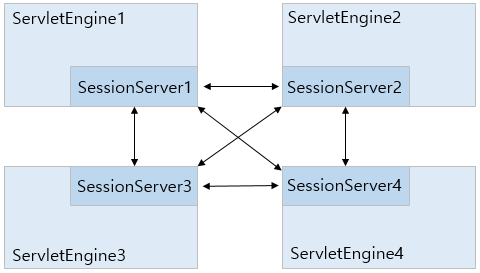
The arrows in the previous structure map represent possible socket connections between the distributed session servers. Instead of having all sockets always be connected to each other, they connect and maintain the connection only when they need to communicate with other engines in order to maintain a session.
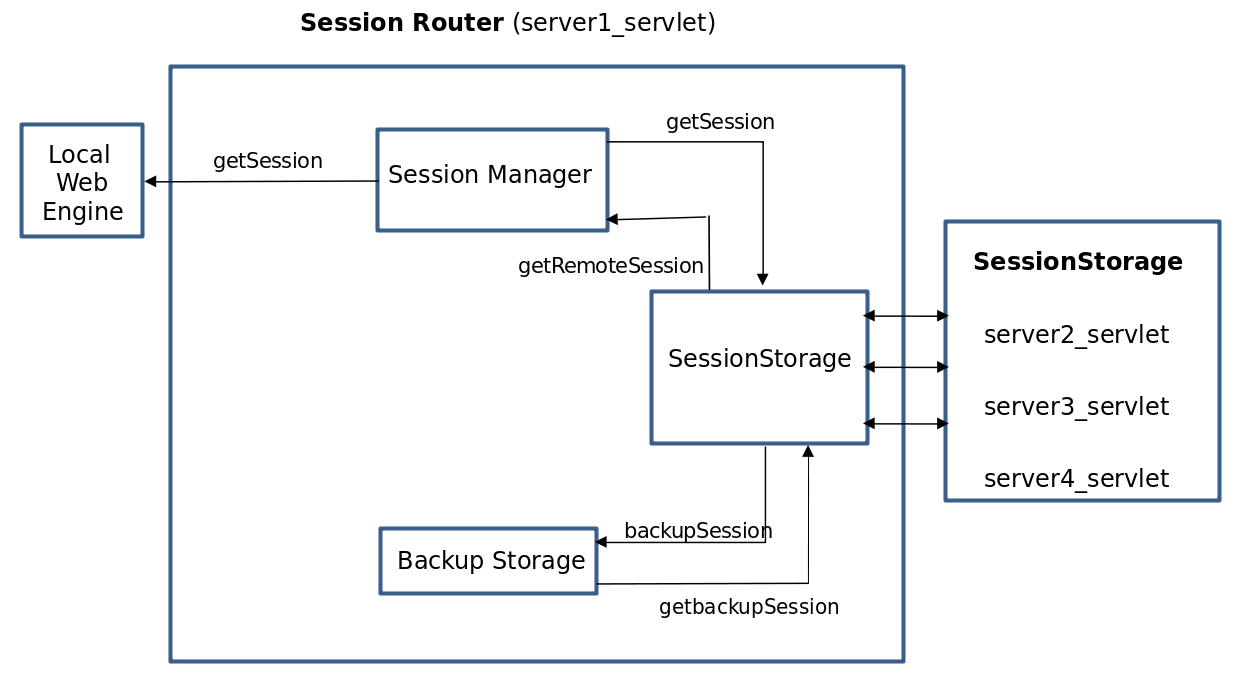
The following diagram shows the internal structure of a distributed session server, which is a subcomponent of the web engine.
-
Session Manager
-
Executes overall controls over engine sessions. Sessions are gathered from the local memory, files, or other remotely distributed session servers.
-
The local web engine obtains session objects to use from the Session Manager by using the getSession method. First, it collects sessions from the sticky servers, and then retrieves those from the previous backup servers.
-
If a remote backup exists, modified sessions are backed up in memory using the backupSession method to a distributed session server that is designated as the backup server in another web engine, through the Cluster Manager.
The 'Backup Level' setting is used to determine if a session has been modified. A session is considered modified when a session operation, such as setAttribute, removeAttribute, and setMaxInactivateInterval, is called while the 'Backup Level' is set to "all", the 'Backup Level' is set to "get" and a getter or setter method is called, or the 'Backup Level' is set to "set" and a setter method is called.
For details about this configuration, refer to Session Cluster Configuration.
-
-
Backup Storage
-
Manages the backup session objects that are periodically sent from another engine’s distributed session server. This backup session object provides a replacement session if a failure occurs in the engine that contains the original session.
-
It receives the backup sessions from the remote web engine which is designated as a backup, and then saves and manages the backup session using backupSession and getBackupSession methods.
-
When the conditions are met for locally modified session objects, they are backed up to the distributed session server. Once the request is complete, the modified session objects are immediately backed up so that failover can be performed in case of a system failure.
-
-
Cluster Manager
-
Dynamic Remote Web Engine is a module that acts as a mediator when a specific operation is performed on a session in the remote web engine.
This engine operates by considering the dynamic nature of the environment. It selects an appropriate backup every time a server is added or removed. This is one of the major changes in JEUS that is not related to environment configuration. The connection to the remote engine is verified through SCF instead of constant pinging to avoid sending repeated error messages for an ongoing error situation.
getSession() and removeSession() from a remote web engine can be examples.
Previous versions of JEUS only recognizes the backup engine that is fixed in the configuration file. Now, it is designed to allow dynamic changes to the remote engine.
-
4. Server Process
This section compares the behaviors of centralized and distributed session servers.
4.1. Centralized Session Servers
The web container is linked to the centralized session server. When the web container detects a newly created or modified session object, it stores or updates the object in the centralized session server. It also retrieves session objects from storage in response to client requests.
-
Primary Server
Web container sessions are distributed across a group of primary servers. The distribution is hash-based, using the session ID used as a key to determine the target primary server for storing session data.
By increasing the number of primary servers, memory usage is spread across more servers, effectively achieving memory distribution.
-
Backup Server
Each primary server has one or more corresponding backup servers, depending on the configuration.
A backup server replicates and stores session data from its associated primary server in real time. If a primary server fails, the web container retrieves session data from the backup server, minimizing service interruption. Increasing the number of backup servers further enhances data reliability.
|
In earlier versions, the JEUS centralized session server used a structure where primary and backup servers performed mutual roles. However, this design posed a high risk of failure propagation and limited scalability and operational flexibility. Therefore, configuring ring or chain structures in new centralized session servers is not recommended. Instead, it is recommended to configure at least two primary servers, each with multiple backup servers. |
4.2. Distributed Session Servers
By default, distributed session servers use session routing. Session routing attaches the name of a specific session server to the session ID so that it knows which server contains the session data. Performance is enhanced when session routing is used.
Web servers that support session routing route requests to the web engine that contains the required session object. Session routing works in the same way for distributed session servers. For additional information, refer to Session Tracking in Clustered Environments.
A session key is used for distributed session servers that use session routing.
The following example shows a session key being used in a web engine.
<SessionID>.<primary-engine-name>
Example) XXX.domain1/server1
| Item | Description |
|---|---|
XXX |
Session ID. The actual session ID is a random string that is longer in length. |
domain1/server1 |
Routing information. A servlet engine named domain1 is used. |
Each engine is assigned a session routing ID for session routing that identifies the web engine when it connects to the web server. The session routing ID is automatically created according to its configuration.
For the three web engines in Distributed Session Servers - Failover Structure.
-
WebEngine(server1)
-
Session routing ID: domain1/server1
-
Session routing ID of the backup server: domain1/server2
-
-
WebEngine(server2)
-
Session routing ID: domain1/server2
-
Session routing ID of the backup server: domain1/server3
-
-
WebEngine(server3)
-
Session routing ID: domain1/server3
-
Session routing ID of the backup server: domain1/server1
-
The following diagram shows the failover structure of session tracking that uses the session routing ID assigned to each distributed session server.
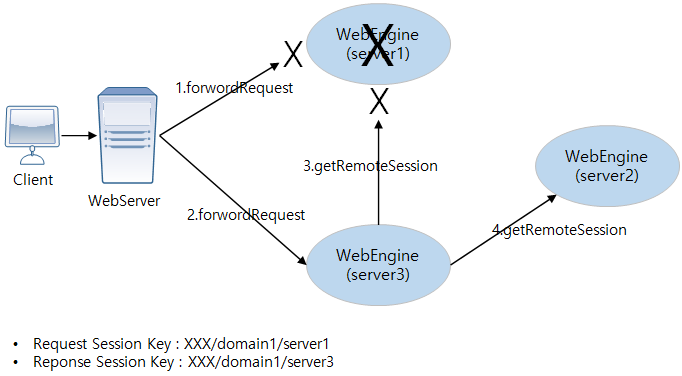
The following describes the failover structure in Distributed Session Servers - Failover Structure.
-
The web server checks the session routing ID and attempts to send the request to web engine server1, but server1 has failed.
-
The web server arbitrarily selects a different web engine and sends the request. In this example, server3 is selected.
server3, which received the request from the web server, checks the session routing ID and determines that server1 contains the session object for the request, and that the backup exists in server2.
-
server3, which is a distributed session server, attempts to retrieve the session object by connecting to server1, but the request fails due to the failure of server1.
-
Because the request failed, server3 attempts to connect to the backup server, server2. Server2 returns the backup of the requested session object to server3.
-
Server3, which has successfully retrieved the session object, processes the client request and sends the response message to the client. A new session key is created and sent, the client’s session key is modified, and future requests are forwarded to server3. When a new session key is created, only the session routing ID is changed.
Web servers cannot provide session routing in situations where the request cannot be sent because the web engine has failed or there is no connection to the target web engine.
The following describes the scenario illustrated in Distributed Session Servers - Failover Structure for distributed session servers where session routing is not used.
-
Without session routing, the session ID does not exist. The web server tries to send a request to an arbitrary web engine. In this example, web engine server1 is selected.
-
The web server detects that server1 has failed and selects another web engine, server3, and sends the request again.
-
Because server3 does not know the routing information of the session, it sends a request to the currently connected distributed session server, server1, but the attempt fails.
-
The distributed session server sends the request to server2, and server2 returns the session.
-
Server3, which received the session, sends the unmodified session key to the client. As a result, the next request may not be sent to server3 that contains the session.
The routing information is given as 'domain1/server1' for the reader, but this information is encoded during operation.
A session is an object used for a request. Session specifications do not guarantee session manipulation in another JVM or thread. The manipulation must be guaranteed by an application, which is not recommended.
If an application needs to send concurrent requests, the requests must be either sent to different sessions or must not use a session. This is required for a normal operation. However, some recent applications are implemented for multiple requests using a shared session.
The following issues may occur when multiple requests are processed using sessions.
-
Multiple sessions can be created at the same time. Since only one of them is maintained using a cookie, memory is wasted.
This issue occurs when requests are sent to different JVMs or processed at the same time. Since a new session is created by default if there is no available session, concurrent requests result in creating multiple sessions. The sessions are stored in cookies of a user browser. Since the cookies are managed within one scope, the last session information overwrites all the other session information. Therefore, the other sessions cannot be accessed and removed after a timeout period.
-
A session may not be maintained according to a method for maintaining the session in multiple JVMs. This issue is related to sticky session routing and occurs only when requests are sent to multiple servers or web engines. When multiple requests are sent to multiple JVMs at the same time, sessions may be lost according to a session maintaining method.
-
Multiple sessions may not be updated if they are tried to be updated at the same time.
This issue occurs only when requests are sent to multiple servers or web engines like in the above issue. Since one request must be sent to update one session, updating multiple sessions has the similar issue that occurs when creating multiple sessions.
As described above, no issue occurs when concurrent requests are sent to the same server or web engine. However, if an application sends concurrent requests to multiple servers or web engines, sessions are lost as in the above figure. To prevent this, JEUS 9 uses the Copy & Update approach.
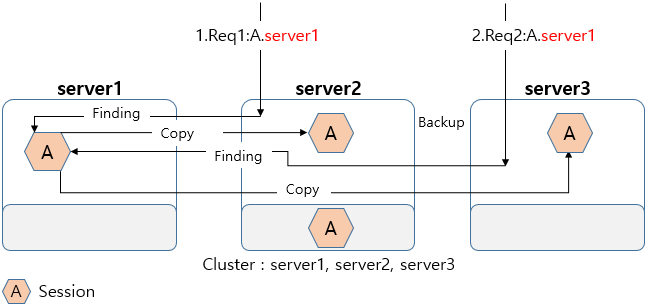
Although concurrent requests are sent to multiple servers, sessions are not migrated and copied for local manipulation. Manipulation results are updated in a server with ownership of each session. Disabling migration prevents losing sessions and has no issue when used to simply check session values.
|
Since a session is a temporary object used to save and manage simple information, it must not be used like a database which exists in all systems. Use a session only to refer to an object value. It is not recommended to use a structure or configuration in which multiple requests are sent to multiple servers concurrently. |
5. Main Features
This section describes the main features of distributed session server.
5.1. Duplicate Login Prevention
Distributed session servers provide duplicate login prevention function that include the basic duplicate login management functions provided by applications.
Duplicate login prevention of distributed session servers prevents duplicate login using a single application ID. When the same ID is used to log into two different sessions, the existing session is removed to prevent duplicate login.
To prevent duplicate login, the login manager is configured similar to the existing centralized session server. A server that stores the login information is specified among the servers in the cluster, and a secondary server is configured to prepare for failure.
Duplicate login prevention can be configured for each Session Storage, and each login information is managed by Session Storage. To use this feature, set login-manager to true with the property of Session Storage.
The following figure illustrates the process of duplicate login prevention.
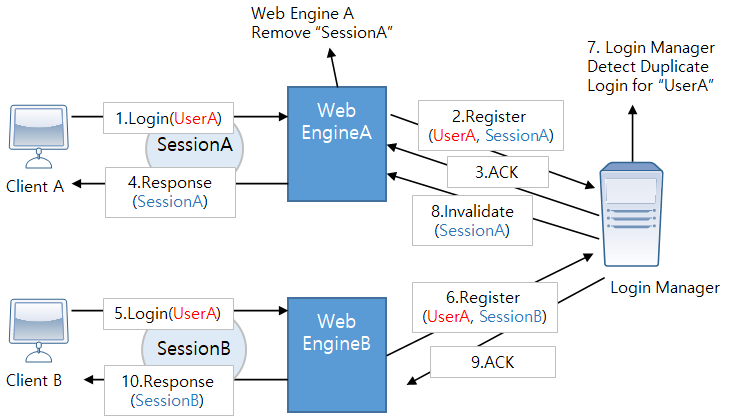
The following is description of The Process of Duplicate Login Prevention.
-
Client A using SessionA tries to log into Web EngineA with the ID, UserA.
-
Web EngineA registers the login information in the Login Manager.
-
The Login Manager sends ACK for the login to Web EngineA.
-
Web EngineA sends a response to Client A.
-
Client B that is using SessionB tries to log into Web EngineB with the ID UserA.
-
Web EngineB registers login information in the Login Manager.
-
The Login Manager detects a duplicate login.
-
The Login Manager tells Web EngineA to discard the existing session SessionA and Web EngineA deletes the session.
-
The Login Manager sends ACK for the login to Web EngineB.
-
Web EngineB sends a response to Client B.
|
Since login is an event in an application, there are restrictions for sending a login event from the JEUS Login Manager. JEUS Login Manager sets the method of retrieving LoginID with the user-info in the property of Session Storage. If removeAttribute is executed with the same key, logout occurs and the invalidated session is automatically logged out. |
5.2. Failback
This section describes failback for distributed session servers. Failback is a basic function for session servers. It allows for a service to continuously operate even during a failure situation. That is, although a failure occurs in a server, a session is not lost and continuously provides a service because the session’s backup is dumped to another session.
Failback provided by JEUS is for not only one failure but also consecutive failures, such as multiple servers' consecutive restart, and recovery of a server with a failure. The following explains this with a scenario that two servers restart consecutively.
The following figure shows the scenario when failback is not supported.
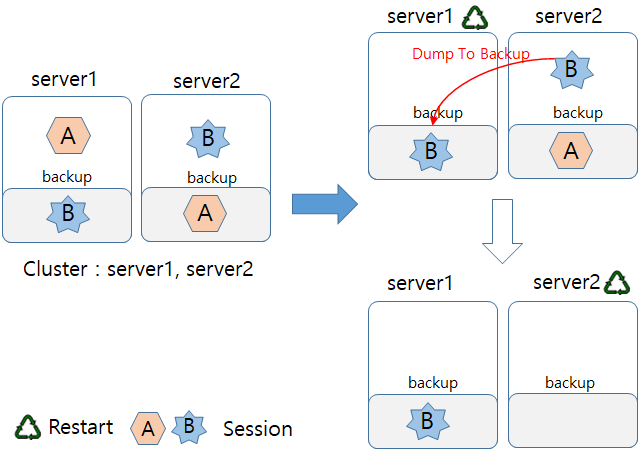
If Server1 restarts, session A that belongs to the Server1 exists only in Server2 as backup. If Server2 restarts later, its backup will be removed, which means that the session A is removed from the entire system. If there is a request for the session A, a new session is created. This is because session backup is not processed in previous distributed session servers.
The following figure shows the scenario when failback is supported.
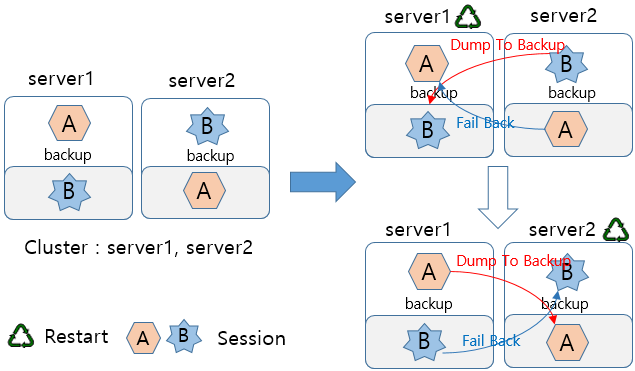
When Server1 restarts, DumpToBackup for session B is the same as in the case that failback is not supported. Additionally, session A in Server1 is recovered by performing failback with backup of session A in Server2.
Even after Server2 restarts later, all sessions are maintained.
|
Even though failback is not supported, a session is maintained if there is an access to the session when a server failure occurs (failover). This is possible because a backup session exists. The accessed session is backed up again to another server (DumpToBackup), it can operate normally. For this, some web servers try to maintain all sessions by accessing them. |
Failback is executed using a reply-response approach determined by the configuration.
When server A is used as a backup server for server B, failback starts if the server A detects that the server B restarts.
-
Server A checks whether server B restarts and to have backup of server B’s sessions.
-
If failback is set to true, the server A transfers backup of the server B’s sessions to the server B.
|
If OOM occurs, failback is not recommended. If too many sessions are backed up, failback may cause OOM continuously. Failback is supported for rolling patches because servers need to be restarted consecutively without a session disconnection. |
6. Session Cluster Modes
This section describes JEUS session cluster modes.
Session clustering is used to share sessions. Sessions must be shared within the same scope and must not be shared in different scopes. A session scope is determined according to a cluster mode.
JEUS supports the following three session cluster modes.
6.1. Default Session Cluster Mode
JEUS provides the default session cluster mode.
When servers are clustered, this mode is supported automatically and session data can be shared and used by the servers. Since this mode complies with servlet’s basic session scope specifications, each application can manage a session independently and basic session clustering functions, such as failback and load balancing, are supported. The default scope is an application. Clustered servers can be a scope by using the Scope setting for Session Storage provided by a web engine session manager.
6.2. Domain-Wide Session Cluster Mode
In the domain-wide session cluster mode, all applications deployed in servers within a domain are regarded as a scope.
The default session cluster mode is restricted (targets to be deployed in a server) by a cluster structure because the mode depends on the cluster. In JEUS 6, different applications are deployed in each container and all containers' sessions can be shared.
The following sample scenario describes more details.
-
There are two nodes and each node has two containers.
-
A different application is deployed in each container. That is, a total of four applications exist.
-
As a result, all sessions in the four containers can be shared.
The above scenario does not match the server cluster concept. Since all applications must be shared in a cluster, an application is forcibly deployed in all servers in the cluster. In a reliable environment, forcibly deployed applications may waste resources. However, they prevent the occurrence of a service not being available because a deployed application only physically exists in a specific server even though the server is included in a cluster. Therefore, a server must not be clustered to deploy a different application in each server.
Use the DOMAIN_WIDE mode when using session clustering without participating the server cluster.
The mode does not comply with domain structure specifications and is supported for user convenience. Note the following restrictions.
-
The mode is not related to EJB and only affects web applications.
-
If a server cluster as well as the mode are configured, the server cluster configurations will be ignored.
-
If the mode is set in domain.xml of a domain, it is applied to all servers in the domain. Some servers in the domain cannot be specified as a target of the mode.
|
The domain-wide session cluster mode overrides server clusters. |
6.3. Session Storage Scope Cluster Mode
Applications or clusters in the storage are considered being in the same scope.
The session storage scope cluster mode groups certain applications or clusters for sharing sessions, independently of the basic cluster setup. This mode is used when multiple groups exist. It differs from the basic session cluster or domain-wide session cluster mode in that the latter are generally used when only one application group exists. The session cluster has a different scope from distributed session servers, but it operates in the same way as the central/distributed session servers. Through the session storage scope mode, sessions can be shared between server clusters, and multiple scopes can be configured for a single server. This can be used in place of the existing specific-scope session cluster mode.
7. Session Cluster Configuration
This section describes the basic configuration of a session cluster.
A session cluster is basically used to share sessions. In addition to the cluster, to share sessions, a session server operates in a web engine and supports related functions. The operations and functions can be configured.
Settings for the session server can be configured in domain.xml and console.
<session-cluster>
    <cluster-mode>DEFAULT</cluster-mode>
    <session-storage>
        <name>jeus-session-storage1</name>
        <session-manager-provider>DISTRIBUTED</session-manager-provider>
        <scope>
            <name>jeus-distributed-scope</name>
            <session-config>
                <timeout>30</timeout>
                <max-session-count>-1</max-session-count>
                <reload-persistent>false</reload-persistent>
                <tracking-mode>
                    <cookie>true</cookie>
                    <url>false</url>
                    <ssl>false</ssl>
                </tracking-mode>
                <session-cookie>
                    <cookie-name>JSESSIONID</cookie-name>
                    <url-cookie-name>jsessionid</url-cookie-name>
                    <version>0</version>
                    <max-age>-1</max-age>
                    <path>/<path>
                    <secure>false</secure>
                    <http-only>true</http-only>
                    <same-site>Disable</same-site>
                    <partitioned>false</partitioned>
                </session-cookie>
            </session-config>
            <target-cluster>cluster1</target-cluster>
        </scope>
    </session-storage>
    <session-storage>
        <name>jeus-session-storage2</name>
        <session-manager-provider>CENTRAL</session-manager-provider>
        <scope>
            <name>jeus-central-scope</name>
            <session-config>
                <timeout>30</timeout>
                <max-session-count>-1</max-session-count>
                <reload-persistent>false</reload-persistent>
                <tracking-mode>
                    <cookie>true</cookie>
                    <url>false</url>
                    <ssl>false</ssl>
                </tracking-mode>
                <session-cookie>
                    <cookie-name>JSESSIONID</cookie-name>
                    <url-cookie-name>jsessionid</url-cookie-name>
                    <version>0</version>
                    <max-age>-1</max-age>
                    <path>/<path>
                    <secure>false</secure>
                    <http-only>true</http-only>
                    <same-site>Disable</same-site>
                    <partitioned>false</partitioned>
                </session-cookie>
            </session-config>
            <target-application>sessionTest.war</target-application>
        </scope>
        <central-session-manager>
            <group-name>central1</group-name>
        </central-session-manager>
    </session-storage>
    <property>
        <key>encoding-rule</key>
        <value>BASE64</value>
    </property>
    <jeus-login-manager>
        <login-manager-type>REDIS</login-manager-type>
        <primary>server1</primary>
        <secondary>server2</secondary>
        <property>
            <key>redis-nodes</key>
            <value>redis://localhost:6379</value>
        </property>
    </jeus-login-manager>
</session-cluster>
<jeus-central-session-server-definition>
    <group>
        <name>central1</name>
        <servers>
            <server>
                <primary>192.168.0.11:9736</primary>
                <backup>192.168.0.13:9736</backup>
            </server>
            <server>
                <primary>192.168.0.12:9736</primary>
                <backup>192.168.0.14:9736</backup>
            </server>
        </servers>
        <property>
            <key>connect-timeout</key>
            <value>30000</value>
        </property>
    </group>
</jeus-central-session-server-definition>
7.1. Basic Configuration
The following describes common settings applied in the entire domain. You can edit each item in domain.xml.
| Item | Description |
|---|---|
cluster-mode |
Session cluster mode.
Each session cluster mode has a different scope, but uses the same distributed session server configuration options. The method for configuring session storage is described below. |
jeus-login-manager |
JEUS Login Manager type, and its primary and secondary servers.
|
property |
A property can contain two types of key.
The property can also be set through the console. For more information, refer to set-sessionserver-property in JEUS Reference Guide. |
7.2. Session Storage
You can add, modify, and delete using domain.xml or console commands.
Refer to Session Commands in JEUS Reference Guide.
| Item | Description |
|---|---|
Name |
Storage name. |
Session Manager Provider |
Reserved word used as the session manager. Five reserved words are supported for configuration. For details about these reserved words, refer to Session Manager Provider Reserved Words. |
Central-session-manager |
Target session server when using JEUS centralized session clustering. This setting is valid only when 'Session Manager Provider' is set to CENTRAL.
|
Property |
Storage properties. For information about valid property keys, refer to Valid Keys for Property. |
7.2.1. Session Manager Provider Reserved Words
The following describes the reserved words that can be configured for the 'Session Manager Provider' in Session Storage settings.
-
DISTRIBUTED
Uses distributed session clustering provided by JEUS. (Default)
-
CENTRAL
Uses centralized session clustering provided by JEUS.
-
REDIS
Uses Redis as the session storage. Redis version 5 or later is required. The Redis settings are specified in the property section of session-storage.
The following describes valid keys.
-
Specify the Redis architecture, either as 'standalone' or 'cluster'. (Default: standalone)
Example<key>redis-architecture</key> <value>standalone</value>
-
Specify the Redis node. If the architecture is cluster, list the cluster members with comma delimiters. (Default: redis://localhost:6379)
Example<key>redis-nodes</key> <value<redis://127.0.0.1:7006,redis://127.0.0.1:7007,redis://127.0.0.1:7008</value>
-
-
HAZELCAST
Uses Hazelcast as the session storage. Hazelcast version 4.2 is required. Hazelcast settings are specified in the property section of session-storage.
The following describes valid keys.
-
Specify the Hazelcast architecture, either as 'standalone' or 'cluster'. (Default: standalone)
Example<key>hazelcast-architecture</key> <value>standalone</value>
-
Specify the Hazelcast node. (Default: localhost:5701)
Example<key>hazelcast-nodes</key> <value>localhost:5702</value>
-
Specify the Hazelcast cluster. (Default: dev)
Example<key>hazelcast-cluster</key> <value>dev</value>
-
-
RUNTIME
Uses another implementation instead of JEUS-supported providers', if any. If no other implementation exists, one of those three JEUS-provided implementations will be set.
7.2.2. Valid Keys for Property
The following is an additional description for the 'Property' section of the Session Storage configuration.
-
When the Provider is DISTRIBUTED or CENTRAL
Item Description reserved-thread-num
Number of threads in the system thread pool. Only recommended for use if a service requires preallocated threads.
connect-timeout
Timeout value for opening a connection between session servers in the web engine.
read-timeout
Read timeout value for communication between session servers in the web engine. After sending data, this is the maximum amount of time to wait for a response.
backup-level
Session standard used when backing up a session to a remote web container or a local database file.
-
access: Updates each session attribute and backs up specific attributes that calls setAttribute, putValue, removeAttribute, removeValue, getAttribute, and getValue. (Default value)
-
set: When the session’s setAttribute, putValue, removeAttribute, or removeValue method is called, the session is considered modified and the session object is backed up.
-
get: When the session’s setAttribute, putValue, removeAttribute, removeValue, getAttribute, or getValue method is called, it is considered modified and the session object is backed up.
-
all: Backs up all sessions. When the session’s HttpServletRequest.getSession() is called, it is considered modified and the session object is backed up.
backup-unit-size
Maximum number of transferred sessions to be backed up at the same time.
backup-queue-size
Size of a queue that saves sessions that are not transferred normally to be backed up due to network delay.
If there is no backup in a distributed session server, a session may be lost in a failure situation. Therefore, if the queue is full, a request is delayed so that a flow control can be performed without an issue.
backup-flowcontrol-enabled
Option to allow a service to continue even if a backup queue is full. This is used to ignore session loss in order to continue a service.
failover-delay
Amount of time to wait for recovery when an engine fails.
This is the timeout for the other engines besides the failed one to reconnect to the cluster.
restart-delay
When an engine shuts down normally, this is the timeout for the other engines to reconnect to the cluster. This setting enhances the performance for a restart which is the most frequent case of shutting down a web engine.
user-info
Path to the location from which the user information can be retrieved.
login-manager
Option to use the login manager.
-
false (Default value)
-
true
login-manager-strategy
Login manager operating strategy.
-
invalidate-before: When duplicate login is detected, the previous session is invalidated. (Default value)
-
invalidate-after: When duplicate login is detected, the later session is invalidated.
-
-
When the Provider is REDIS
Item Description redis-nodes
Redis node. If the architecture is a cluster, list the members with comma delimiters. (Default: redis://localhost:6379)
redis-architecture
Redis architecture. One of the following:
-
standalone (Default value)
-
cluster
-
-
When the Provider is HAZELCAST
Item Description hazelcast-nodes
Hazelcast node. (Default: localhost:5701)
hazelcast-cluster
Hazelcast cluster. (Default: dev)
hazelcast-architecture
Hazelcast architecture. One of the following:
-
standalone (Default value)
-
cluster
-
7.3. Scope
The following describes settings for the scope.
| Item | Description |
|---|---|
name |
Scope name. |
target |
Target application or cluster to be included in the scope (only one can be configured).
|
session-config |
Session configuration to be used by the context included in the scope. For information about detailed configuration, refer to Session Configuration. |
8. Centralized Session Server Configuration
This section describes how to configure the centralized session server provided by JEUS.
When using a distributed session server or an external session server, both can be used together by configuring a session cluster. However, a centralized session server must be configured and operated independently.
|
In JEUS 9, the centralized session server must operate independently from the service domains running in the cloud environment. It must be manually configured and started, and should not be subject to scale-in or scale-out operations. |
The following is an example of the configuration.
<domain>
    ....
    <servers>
        <server>
            <name>central-server1</name>
            ....
            <listeners>
                <base>base</base>
                <listener>
                    <name>base</name>
                    <listen-address>192.168.0.14</listen-address>
                    <listen-port>19735</listen-port>
                </listener>
                ...
            </listeners>
            <central-session-server>
                <group-name>central1</group-name>
                <property>
                    <key>connect-timeout</key>
                    <value>10000</value>
                </property>
            </central-session-server>
        </server>
        <server>
            <name>central-server2</name>
            ....
            <listeners>
                <base>base</base>
                <listener>
                    <name>base</name>
                    <listen-address>192.168.0.15</listen-address>
                    <listen-port>29735</listen-port>
                </listener>
                ...
            </listeners>
            <central-session-server>
                <group-name>central1</group-name>
                <property>
                    <key>connect-timeout</key>
                    <value>20000</value>
                </property>
            </central-session-server>
        </server>
    </servers>
    <jeus-central-session-server-definition>
        <group>
            <name>central1</name>
            <servers>
                <server>
                    <primary>192.168.0.14:19735</primary>
                    <backup>192.168.0.15:29735</backup>
                </server>
                <server>
                    <primary>192.168.0.15:29735</primary>
                    <backup>192.168.0.14:19735</backup>
                </server>
            </servers>
            <property>
                <key>connect-timeout</key>
                <value>30000</value>
            </property>
        </group>
    </jeus-central-session-server-definition>
</domain>
-
central-session-server
Configure the JEUS centralized session server to operate as follows.
Item Description group-name
Name of the centralized session server group.
The group must be defined in jeus-central-session-server-definition. For more information, refer to Centralized Session Server Definition.
property
Two keys are supported for the property. This value takes precedence over the corresponding property configured in the group.
-
connect-timeout: Specifies the time to determine whether the centralized session server can connect to another server. The default value is 5000 (5 seconds).
-
read-timeout: Specifies the time the centralized session server waits a response from another server. The default value is 20000 (20 seconds).
-
8.1. Centralized Session Server Definition
The centralized session server definition specifies the primary and backup relationships among the centralized session servers. The IP address and default port of each server must be configured manually.
Multiple groups can be configured independently, as shown in the following example.
<domain>
    ....
    <jeus-central-session-server-definition>
        <group>
            <name>central1</name>
            <servers>
                <server>
                    <primary>192.168.0.11:9736</primary>
                    <backup>192.168.0.13:9736</backup>
                </server>
                <server>
                    <primary>192.168.0.12:9736</primary>
                    <backup>192.168.0.14:9736</backup>
                </server>
            </servers>
            <property>
                <key>connect-timeout</key>
                <value>30000</value>
            </property>
        </group>
        <group>
            <name>central2</name>
            <servers>
                <server>
                    <primary>192.168.0.15:9736</primary>
                    <backup>192.168.0.16:9736</backup>
                </server>
                <server>
                    <primary>192.168.0.16:9736</primary>
                    <backup>192.168.0.15:9736</backup>
                </server>
            </servers>
            <property>
                <key>connect-timeout</key>
                <value>30000</value>
            </property>
        </group>
    </jeus-central-session-server-definition>
</domain>
-
jeus-central-session-server-definition
Defines a centralized session server group. The configuration consists of a group and its sub-settings.
Item Description group
Predefines a centralized session server group.
Multiple groups can be configured independently.
-
Sub-settings
The sub-settings of a group are as follows:
Item Description name
Name of the central session server group.
For the group name, refer to central-session-manager in Session Cluster Configuration and group-name of central-session-server in Centralized Session Server Configuration.
servers
Consists of one or more servers.
Each server section consists of primary and backup servers.
-
primary: Specifies the physical address of the primary server in the 'IP(hostname):port' format.
-
backup: Specifies the physical address of the backup server. It is in the 'IP(hostname):port' format.
Multiple backups can be configured.
property
Two keys are supported for the property. This value is applied to the entire group.
-
connect-timeout: Specifies the time to determine whether the centralized session server can connect to another server. The default value is 5000 (5 seconds).
-
read-timeout: Specifies the time the centralized session server waits a response from another server. The default value is 20000 (20 seconds).
-
-