Introduction
This chapter describes the basic concept and architecture of the batch framework of ProFrame, and briefly describes the types of batch frameworks required for development of a batch program.
1. Overview
In general, online services using Transaction Processing Monitor (TP-Monitor) are mainly used for the tasks that require real-time processing and fast business processing speed. The amount of data is small, and the processing result is clearly communicated when real-time processing is completed. In other words, it is suitable for tasks that require immediate interaction with users.
On the other hand, the batch service is mainly used for time-based event work with large volume data that is difficult to process online in real time.
The batch service performs a task with a high resource occupancy, and unlike the online service, a single execution failure causes fatal damage to the customer’s business processing due to no interaction with the user.
To resolve the issue, the batch framework of ProFrame supports development standardization so that batch programs used in customer’s business can be created consistently, and provides related tools and runtime binaries.
The architecture of the batch framework plays an important role in supporting the development standards of batch processing tasks and providing a useful framework for analysis and design of batches even when encountering various batch processing environments.
The batch framework has the following design principles.
-
Standardized batch processing
-
Standardizing the way batch tasks run
-
Standardizing tasks such as online service linkage
-
Standardizing database processing and file processing
-
-
Convenience in developing batch task
It provides the convenience of batch task development by providing batch parameters with the same meaning as service parameters used in online services. In other words, it means that there is no difficulty in controlling the transaction of the batch service or performing administrative control. In this section, the service parameter refers to the service parameter table for controlling the online service. For details on batch parameters, refer to Batch Parameters.
-
Convenience in managing batch
The batch framework supports developers to develop only the batches they need for their jobs. In addition, by providing the same environment as the online service business development environment, management convenience is provided that does not require separate training for batch program writing.
2. Batch Framework Type
Various types of batch frameworks are created in various batch processing environments. In this chapter, the batches are divided into four types and briefly introduced.
-
general Batch
general batch is the most common type of batch program executed by UNIX Command. And the general batch is mainly used when there are many repetitive tasks such as processing large databases and processing files. For more details, refer to General Batch.
-
POD Batch
Processing On Demand (POD) batch is a batch designed to solve the problem of consistency of database transactions that occurs when connecting to online services in general batch.
In general batch, the consistency problem of database transactions arises from the following causes.
In case of linking online service in general batch, the problem that the result of the database in the online service and the result of the database in the general batch cannot be processed as one transaction occurs due to the unavailable XA transaction provided by TP-Monitor.
POD batch uses the POD server of Tmax to create a process when requesting batch execution to perform the batch task. Unlike the online service, the process is created and executed only when a batch execution request is made, so it has the properties of immediate execution of the batch. And, the XA function, which is an attribute of the Tmax server, enables to solve the problem of consistency of transactions occurring in normal batches. For more details on POD batch, refer to POD Batch.
-
residential batch
A general batch, when a program is executed, is continuously executed until the task is finished, whereas a residential batch executes the program for a certain period of time according to the time set by the developer (or program manager) and then is repeatedly executed. That is, the program is executed using its own scheduling function.
The residential batch is implemented by User Control Server (UCS) of Tmax and is controlled by the Tmax server management. For details on the residential batch, refer to Residential Batch.
-
Batch Job Information
Batch Job Information is a framework that supports the collection of the current execution status and execution result information of the batch created based on ProFrame. For more about batch job information, refer to Batch Job Information.
3. Batch Creation Process
Following describes the batch creation process.
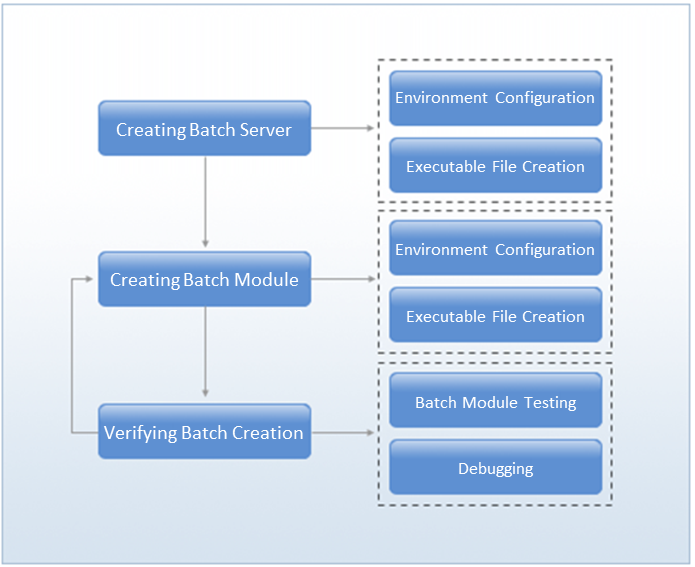
- ① Creating Batch Server
-
This is the procedure to write the execution file and TP server file to call the batch flow of ProFrame. The types of supported batch frameworks are different depending on the result of creating a batch server.
Result Batch Framework Type Execution file
general batch
TP server file
POD batch or residential batch
- ② Creating Batch Module
-
This is the procedure for a developer or batch manager to create a batch processing module.
- ③ Verifying Batch Creation
-
This is the procedure to check the created batch. This procedure includes tasks such as testing or debugging the generated batch module.