Checking Test Log
This chapter describers how to check test log of ProFrame server and Studio.
1. Server
The following describes how to view test log recorded in ProFrame server.
The test log file has the following message format.
-
Each item is delimited by a colon (:).
-
Fields that are empty or have a value with the length less than the maximum length are padded with spaces.
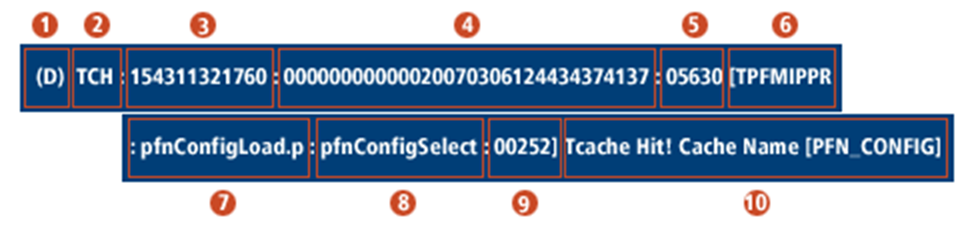
| No. | Item | Max Length | Description |
|---|---|---|---|
① |
Flag |
3 |
Message type. The following describes each message type and its API function.
(Example: (D)) |
② |
Log type |
4 |
Log type. One of the following.
(Example: AP) |
③ |
Timestamp |
12 |
Transaction time in the format of HHMMSSUUUUUU. (Example: 124435417241)/ |
④ |
Global ID |
32 |
Transaction ID. (Example: 00000000000020070306124435374137) |
⑤ |
PID |
7 |
Process ID. (Example: 364792) |
⑥ |
Current service name |
15 |
Name of the service that records log. (Example: TPFMIPPR) |
⑦ |
Execution file name |
16 |
Execution file name. (Example: pfmConfigLoad.pc) |
⑧ |
Execution function name |
16 |
Execution function name. (Example: pfmConfigSelect) |
⑨ |
Line number |
6 |
Line position. (Example: 00252) |
⑩ |
Custom message |
4096 |
Message to output. (Example: TCache Hit! Cache Name{PFM_CONFIG}) |
2. Studio
The following describes how to check SM and BM logs from the unit test screen in Studio.
2.1. SM Log
For SM, TP-Monitor is used.
|
This guide assumes that TmaxSoft’s Tmax is used as TP-Monitor. |
SM log can be checked directly from the server. Check the log file in the server environment variable, $PFMLOG/ulog/(server or service name).
2.2. BM Log
Unlike SM, BM can be tested by using TmaxSoft’s Tmax, which is ProFrame’s embedded TP-Monitor. Therefore, the [View Log] menu that exists for SM does not exist for BM. When displaying unit test results, BM modules' log is displayed at the bottom right.
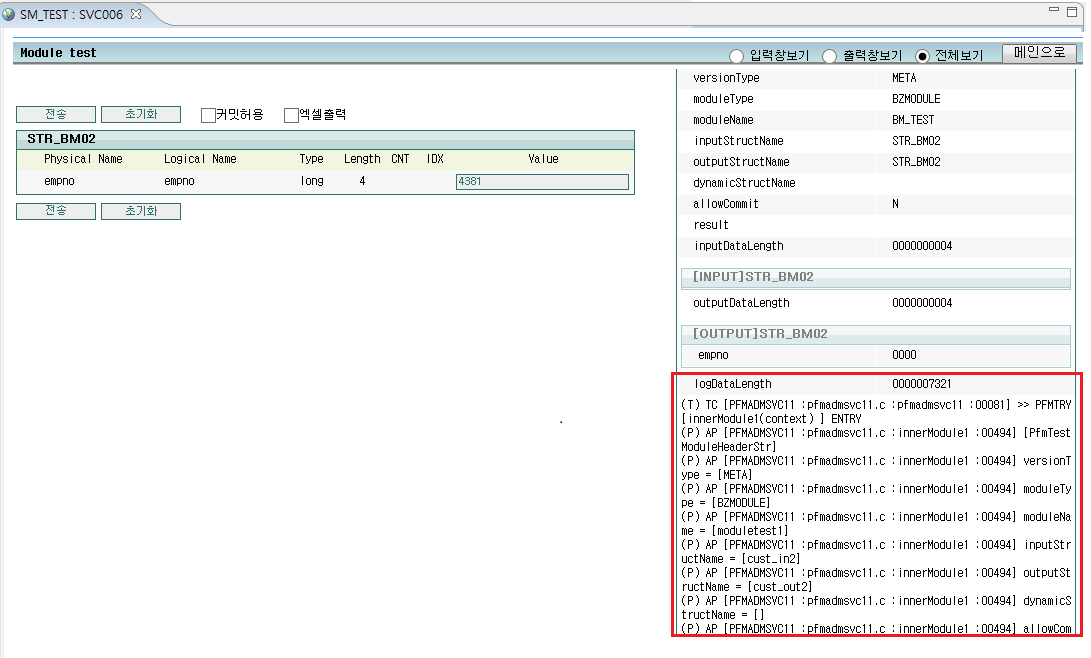
For information about how to set font in Studio, refer to Console Settings.