DWIO Function Use
DWIO is a system that records data to send to a DW system in real time for changes made when INSERT, UPDATE, or DELETE is executed on a specific database table.
When an application uses DBIO that changes a specific database table, the application checks whether the table is a DWLOG target. If the table is a DWLOG target, DWIO is called and the table data is saved in the DWLOG table automatically. The saved data is sent to a DW system by using Enterprise Application Integration (EAI).
1. DWLOG Processing Process
The following shows the process of processing data saved in the DWLOG table.
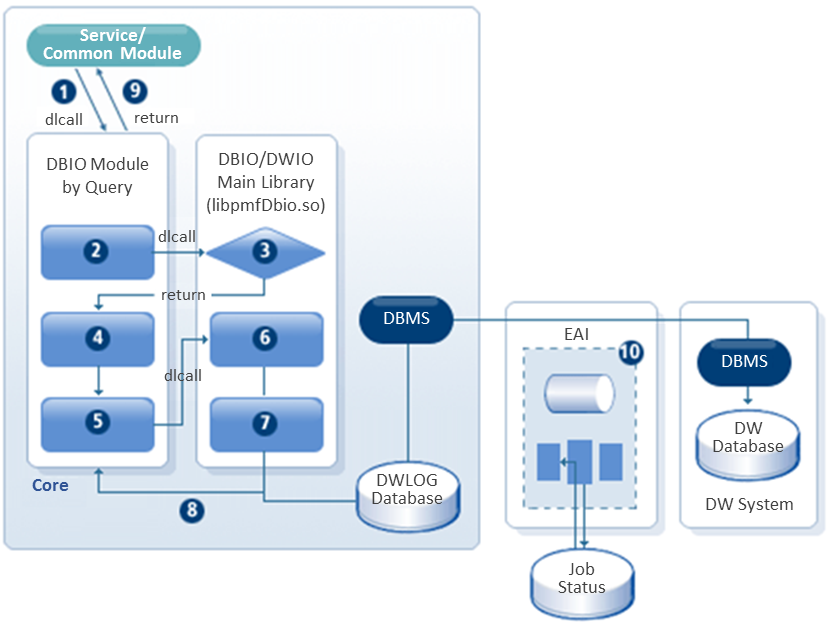
① A service or common module calls a DBIO module with dlcall.
② Execute INSERT, UPDATE, or DELETE depending on the DBIO Exec type.
③ Check the existence of the DW target table from the PFM_DWTARGET table.
④ Collect records before and after changes and then execute the query.
⑤ Call the collected records with dlcall to send to the logging module of the DW system.
⑥ Collect DWLOG data such as global IDs, business days, system dates, and system hours.
⑦ Insert the data to the DWLOG table.
⑧ Returned from the logging module of the DW system.
⑨ Returned from the DBIO module.
⑩ Send the data to the DW system by using EAI.
The following describes necessary functions and libraries.
| Item | Description |
|---|---|
libPfmDbio.so |
Main library for DBIO and DWIO. |
Ls_dwio() |
Module that determines whether DW/BEFORE IMAGE in DWIO’s main library is a target. |
mpfm_is_dwio() |
Library called by is_dwio with dlcall. |
pdw_logs() |
Module that inserts DW log. |
2. DWLOG Scope
Sending all table changes to a DW system in real time by using EAI may impair the performance of processing online service. Therefore, add only necessary tables to the list of target tables. Changes of the other tables can be sent to a DW system by using a batch program.
3. DWLOG Setting
To specify a table as a DWIO target table, add the table to the PFM_DWTARGET table.
The following describes each column of the PFM_DWTARGET table.
| Column | Description |
|---|---|
TABLE_NAME |
Target table name. |
RUNTIME_INSERT |
Data inserted at runtime (number). |
RUNTIME_UPDATE |
Data updated at runtime (number). |
RUNTIME_ DELETE |
Data deleted at runtime (number). |
SOURCEGEN_INSERT |
Data inserted at SourceGen execution (number). |
SOURCEGEN_UPDATE |
Data updated at SourceGen execution (number). |
SOURCEGEN_DELETE |
Data deleted at SourceGen execution (number). |
STR_CREATED |
Blank space, 'N' |