Development Technology
This chapter describes development technology used in ProFrame.
1. Development Architecture
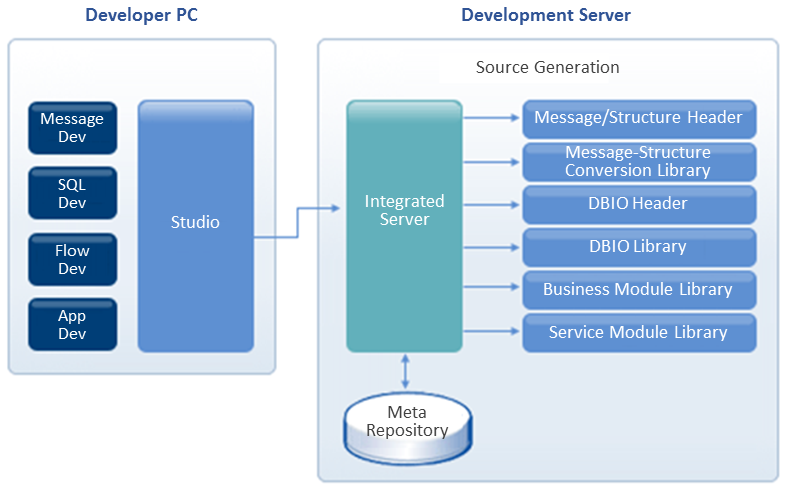
ProFrame provides developers with an integrated development environment where an integrated server and Studio communicates. Through the communication between the integrated server and Studio, developer can develop services and application modules.
-
Integrated server
Communicates with Studio installed in a developer’s local computer to integrate and manage all necessary resources based on meta. Through this, it manages resource versions, resource interdependency, input/output properties, module lists, and privileges for each developer and generates binaries by building source code based on meta information. Through the integrated server, ProFrame can manage and control meta for all application resources.
-
Studio
Tool that visualizes service processing flows and minimizes dependency between application modules based on the design idea of enforcing development standards in the software design stage, minimizing source coding, and maximizing the reuse of application modules. Developers can use this tool to design service flows and develop structures, messages, SQL, application modules, etc.
In addition, Studio communicates with the integrated server by using XML (objects), retrieves resource information from meta storage of a server for release-image (RI) or workspace (WS) area, and requests to compile or save developed source code and information in a server. It also integrates and manages resources such as developer privileges and source versions.
1.1. Integrated Server
ProFrame performs the following by using the integrated server.
-
Manages service and shared module versions.
-
Automatically generates source.
-
Manages history and permissions.
-
Integrates and manages resources.
-
Analyzes resource impact level and performs deployment.
-
Manages users and groups.
-
Provides services for each project.
-
Controls transactions that control operation images and development configurations.
Since multiple development tools are integrated into Studio, ProFrame can provide an integrated development environment. For example, in Studio, source code is automatically generated for information about input/output structures, messages, mappings, service flows, and database accesses. Through the integrated server, all resources are managed as XML meta. A template can be applied to the meta to automatically generate source code optimized for a specific platform. Automatic source generation is enabled by the source generation engine in the integrated server.
Meta-based template source generation method is used for flexible response to changes that occur because of customer requirements or framework optimization. Therefore, ProFrame has a structure that can easily meet the needs of new platforms and programming languages. In addition, since RI and WS areas are separated, developers can minimize impacts on source code of other developers, which enables more flexible development. This structure minimizes and standardize source code and allows to create templates appropriate for development standards, which improves source code readability and allows reliable service with high system performance.
ProFrame’s multi-projects function allows to develop multiple projects at the same time through a single integrated server.
1.2. Studio
GUI development tool that supports rapid and reliable service program development in the unit of online, batch, or module service.
Components
Studio provides the following.
-
ProMapper Editor
This editor saves input/output information by communicating through various channels and converts the information to structure that the service can handle.
-
DBIO Editor
Developers define SQL with DBIO Editor and check the result with the Inspector function, which improves development productivity. Since the created SQL is managed independently, easy maintenance is enabled.
-
EMB Designer
ProFrame assembles modules, such as a module that processes an application, to create another new service. That is, existing service modules can be reused and a new service can be developed without source coding, which enables service-based architecture implementation.
|
For more information about ProMapper, DBIO Editor, and EMB Designer, refer to Development Components. |
Major Functions
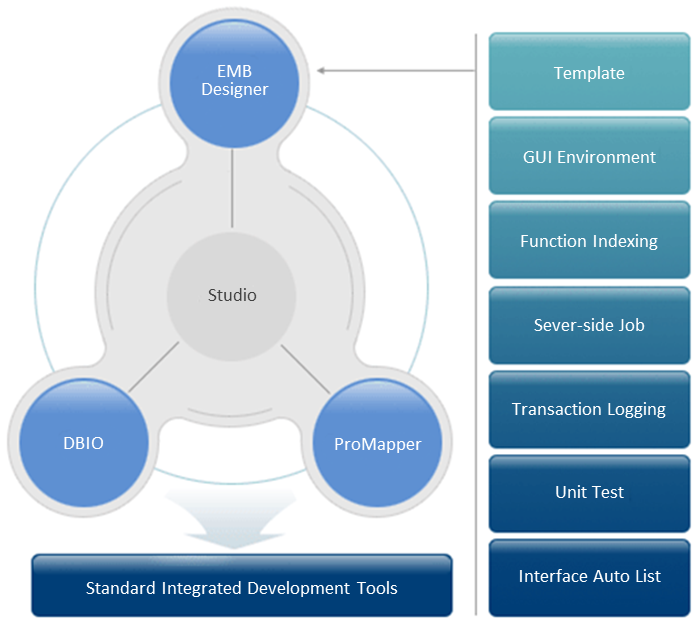
The following are major functions provided by Studio.
-
Templates
Automatically creates structured basic template files.
-
Familiar GUI environment
Provides user-friendly GUI development environment by using an Eclipse-based editor.
-
Function indexing
Allows to easily find a desired function by double-clicking the function in a search window.
-
Server-side jobs
Provides TP monitor program functions such as remote compilation and server startup and shutdown.
-
Transaction logging
Allows to check database transaction log in Studio.
-
Unit tests
Allows to test whether the created service or application module operates normally.
-
Interface Auto List
Provides an interface auto list to easily search the members defined in the input/output interface header file.
-
Multi-projects
Allows to develop multiple projects at the same time.
-
Separation of development area and operation image
Separately manages the development area where resources are modified and the operation image where developed resources are stored.
2. Eclipse 3.2™ Based Plug-in
Studio was developed based on Eclipse 3.2™ as a plug-in. It has common modules (core plug-in and core studio) and providers (ProMapper, DBIO, EMB Designer) installed.
|
For information about Eclipse plugin architecture, refer to http://www.eclipse.org. |
Since Studio was developed as a plug-in, ProFrame provides high scalability and flexibility even when integrated with other systems. It can be installed separately from existing providers, and the installation is easy and simple.
3. Support of Other Systems
Studio can be integrated with other systems as plug-ins, which improves its scalability and flexibility. For example, when integrating with TmaxSoft’s Tmax ProFactory® or Tmax ProRule®, its Eclipse-based plug-ins can be used. Therefore, product factory and rule information can be used in Studio’s EMB Designer. Furthermore, it can be integrated with TmaxSoft’s Tmax ProBus® to use various resources of other systems.