Using ProMapper
This chapter describes how to use each type of ProMapper resources and variable-length array structures.
1. Using ProMapper Resources
Before using each type of ProMapper resources, be aware of the following.
-
When a structure and a message have 1:1 relationship, they are mapped with ProMapper conversion API.
-
When a structure and a message do not have 1:1 relationship, they are mapped based on a developer’s mapping rules between ProMapper resources.
This guide assumes the following.
-
Assumption 1
A structure and a message have 1:1 relationship. That is, ProMapper automatically maps them.
-
Assumption 2
If a structure and a message do not have 1:1 relationship, a developer must map them manually.
|
Note that the order is significant when mapping structures and messages in ProFrame. |
1.1. Conversion When Structure and Message Have 1:1 Relationship
Conversion to Structures
An application converts messages that are received from various external channels to a structure to execute business logic based on the converted structure. For the conversion, the application calls and uses the structure conversion function (pfmMapperUnmarshal). FixedLength and Delimiter type messages can be converted to structures.
The following converts a fixed-length message to a structure.
char *teststr1Msg="TestVar01 TestVar02 " ;
Teststr1 *teststr1;
long teststr1MsgLen, teststr1Len;
…
teststr1MsgLen = strlen(teststr1Msg);
// Conversion from messages to structures
rc = pfmMapperUnmarshal("Teststr1", MESSAGE_FIXEDLENGTH, teststr1Msg,
                         &teststr1MsgLen, &teststr1, &teststr1Len, NULL);
|
For information about API in the previous example, refer to ProMapper API. |
Conversion to Messages
An application needs to convert structures to messages to send data to an external channel, to send a response to a request, or to integrate with another system. This is because sending a structure causes an error related to a pointer, endian, integer-type size, and other issues. For the conversion, the application calls and uses the message conversion function (pfmMapperMarshal) that assembles messages in a platform-independent format and sends them to a communication module. This allows that applications can be used independently without being affected by external channels. FixedLength and Delimiter type structures can be converted to messages.
The following converts a structure to a fixed-length message.
Teststr1 *teststr1;
char *teststr1Msg;
long teststr1MsgLen;
…
// Conversion from structures to messages
rc = pfmMapperMarshal("Teststr1", MESSAGE_FIXEDLENGTH, teststr1,
                       &teststr1Msg, &teststr1MsgLen, NULL);
|
For information about API in the previous example, refer to ProMapper API. |
1.2. Conversion When Structure and Message Do not Have 1:1 Relationship
Converting structures and messages that do not have 1:1 relationship is called map conversion. Map conversion can also be used for structures and messages that have 1:1 relationship. For the conversion, the application calls and uses the conversion function (pfmMapperConv) that converts structures and messages according to mapping rules.
Map conversion can be used for structure conversion, message conversion, conversion between structures, and conversion between messages. For more information, refer to ProMapper API.
The following executes conversion between structures according to mapping rules.
Teststr1 *source;
Teststr2 *target;
long sourceLen;
long targetLen;
sourceLen = sizeof(source);
…
rc = pfmMapperConv("Testmap", source, sourceLen, target, &targetLen, NULL);
1.3. Conversion between Structures in EMB Designer
A structure can be converted to another structure in EMB Designer of Studio.
Conversion between structures is required for the following cases. Bypass is supported for the conversion.
-
When a service module calls another service module
-
When a service module calls a business module
-
When a service or business module calls DBIO
Bypass
Bypass means that a source structure’s values are passed to a target structure without mapping because source and target structures have the same fields. That is, it is used to send values without conversion.
The following example shows Bypass in EMB Designer. Select and right-click a module for which input transformation is executed.
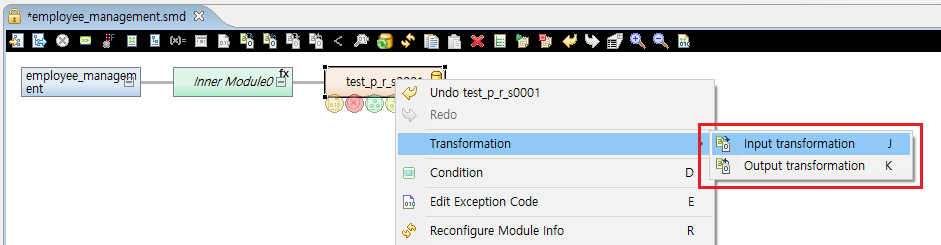
In this example, select [Input transformation] form the context menu. This opens Map Dialog where you can select Bypass.
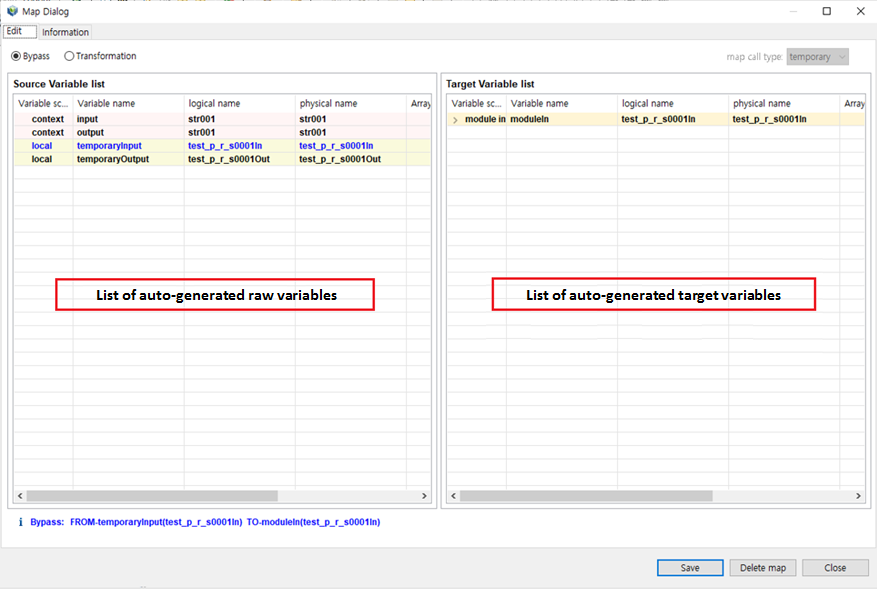
In Map Dialog, there are a raw variable area at left and a target variable area at right. The lists are automatically generated by Studio. For conversion, move raw variables to convert to the target variable area. After conversion, click [Save]. This automatically generates source in an EMB module. The way of output transformation is the same as that of Input transformation.
2. Using Variable-Length Array Structures
Variable-length arrays have a variable number of structure field repetitions while fixed-length arrays have a fixed number of structure field repetitions.
|
It is recommended to avoid the use of variable-length array structures in service or business modules. Whenever API related to a variable-length array is called, memory is reallocated internally. This affects system performance. In addition, since memory heap area is used, infinite data can be allocated to a variable-length array. This can affect other processes. |
When using a variable-length array, set a maximum size and do not process any more if data is larger than the maximum size. Be careful of using a variable-length array for DBIO output because the number of DBIO outputs can be infinite and this affects the system seriously.
If you must use a variable-length array, use pfmVarrayCount to check the maximum number of elements in the variable-length array. For more information about API, refer to ProMapper API.
2.1. Creating Variable-Length Array Structures
If the number of output structure repetitions cannot be set, create a variable-length array structure by declaring the number of included structure arrays as a variable value.
The following creates a variable-length array structure.
Set the array size of 'str1_in_physical' to 'empno', not a constant value. This makes the 'str1_in_physical' array as a variable-length array structure. The 'empno' variable must be a field that exists in a structure.
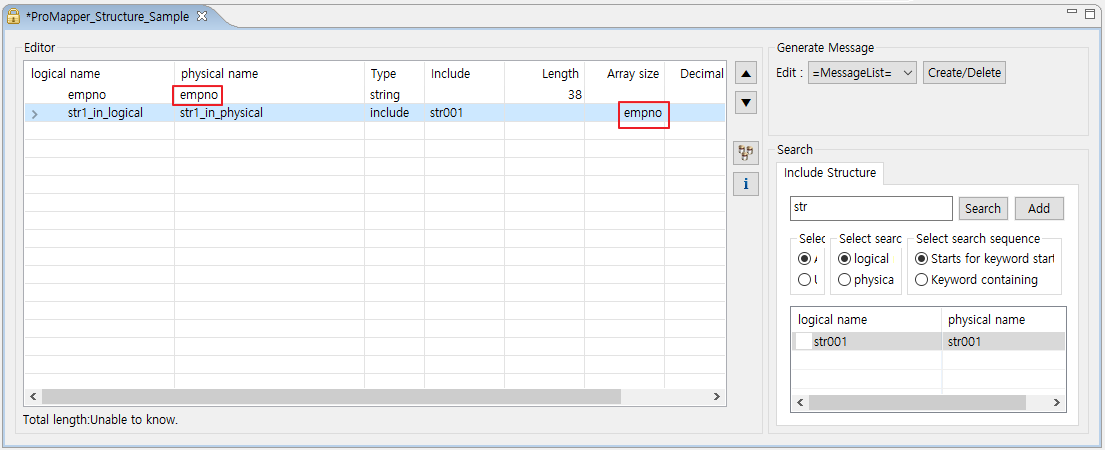
To use variable-length array structures, use variable-length array API.
To use variable-length array structures, the following steps are necessary.
-
Checking the maximum number of elements in the variable-length array
An application must set and check the maximum number of elements in the variable-length array. The maximum number is decided by comparing the structure’s "sizeof size * the number of variable-length arrays" and the maximum output size.
Check the maximum number by using pfmVarrayCount and handle an error that occurs if variable-length array allocation exceeds the maximum number.
if( pfmVarrayCount(OUTPUT->str1_in_physical) >= 25 ){ PFM_ERR("TRSE001001", "The maximum output number is exceeded. Allocated:[%ld]", pfmVarrayCount(OUTPUT->str1_in_physical)); return RC_ERR; } -
Allocating a variable-length array
Allocate one by one by using pfmVarrayAppend. Increase the value of 'OUTPUT→empno' that specifies the number of outputs as follows:
for( int i = 0; i < PDB_RECNUM; i++){
    /* The PDB_RECNUM macro is the number of records with temporaryOutput2 */
    pfmVarrayAppend( OUTPUT->str1_in_physical, &temporaryOutput2[i]);
    OUTPUT->empno++;
}
For more information about using a variable-length array, refer to Example of Using a Variable-Length Array.