Development Components
This chapter describes resources and properties required to develop modules in the unit of service and application. It also explains about representative providers embedded in Studio: ProMapper, DBIO, and EMB Designer.
1. Resources
Since ProFrame manages all developed resources as meta, it can provide a powerful integrated development environment.
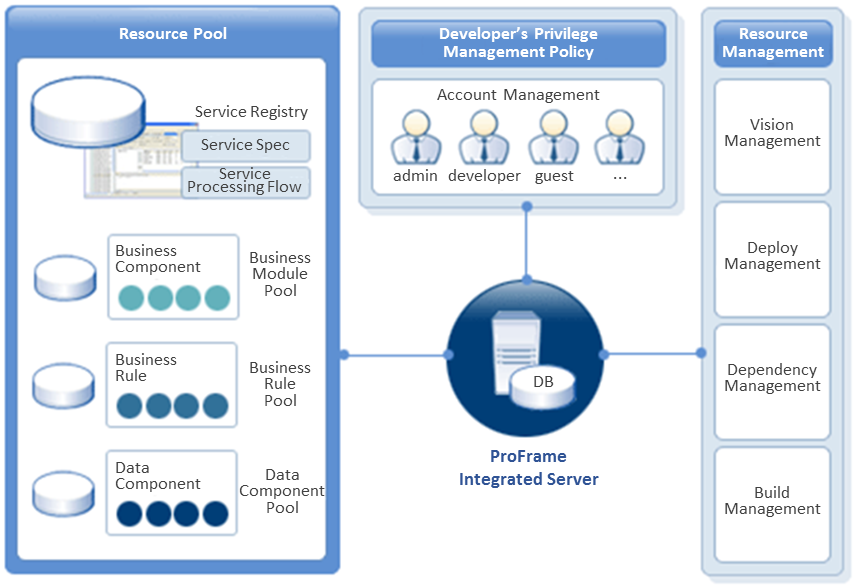
All resource information of ProFrame is basically expressed in XML meta, stored in a database of the integrated server, and managed by the server. By adopting a template-based source generation method with XML meta, it can be managed without being dependent on a specific platform. It has a structure that generates source optimized for a specific platform according to a selected template (C, Java, or others) and saves it along with XML meta in the integration server. In addition, it provides a structure that can selectively store built binaries for deployment and configuration management.
For efficient management, basic information expressed in XML is separately managed in a specific table of a database, which allows to efficiently perform impact analysis, dependency check, version management, deployment management, and configuration management.
Source creation, compilation, and build can be performed in the integrated development environment. With separate commands of the integrated server, they can be performed in batch by using the template engine based on XML meta. In other words, source creation, analysis, and design phases' resources are managed through the integrated server, and version and history management is also provided by the server.
2. Properties
ProFrame registers various types of terms such as IT terms, application terms, database names, and column names in a data dictionary, manages them, and use them when developing applications. The terms are called properties, and the properties are used the same both in RI and WS.
Properties can be used for the following.
-
Code-based modeling
Source is generated as code values.
-
Data integration and management
Enterprise-wide integration and management are provided through the discussion system of data designers, analysts, developers, and quality managers.
-
Unified view
Integrating meta data is shared across the enterprise with a unified view.
3. EMB
EMB is an architecture that visualizes service processing flows and minimizes dependencies between application modules. Based on the SOA architecture, it facilitates the combination between loosely-coupled application modules.
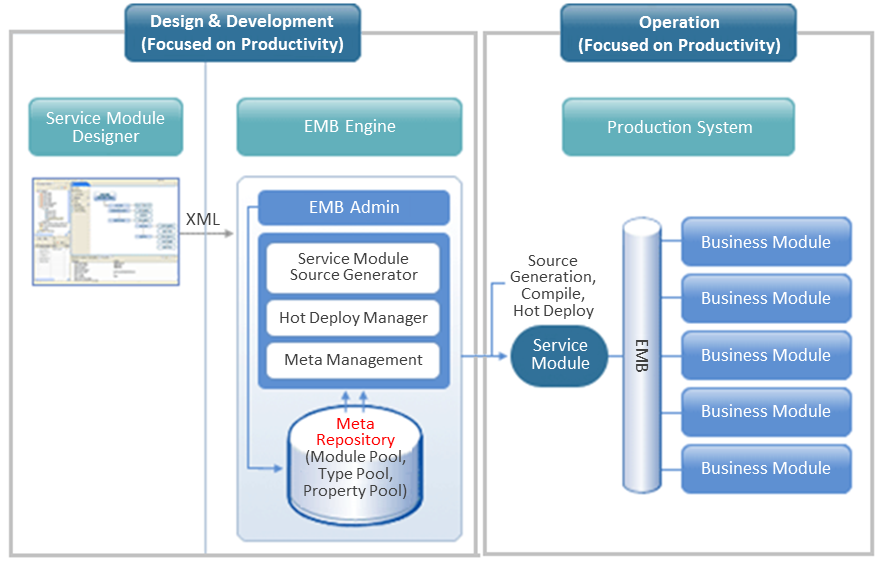
EMB plays a role as a design tool in the design phase and also as a coding tool in the development phase.
EMB provides the following in each phase.
-
Design phase
-
A large unit of workflows is visible.
-
It is easy to analyze impact because of a tree structure.
-
Design with drag and drop is enabled in GUI.
-
-
Development phase
-
Source can be created only with a basic application flow.
-
Input/output mapping can be automatically performed with Smart Mapping of ProMapper.
-
Design changes are applied to a design document in real time.
-
EMB-based systems can provide the following.
-
Business logic as assets
-
Application service flows can be used as assets.
-
Application logic can be reused with the Module Pool and Property Pool functions.
-
Meta Repository based applications, data, and interfaces are standardized.
-
-
Flexible composite service development
-
Application services can be easily assembled and disassembled.
-
Service integration can be implemented in Studio.
-
Module Pool based application logic can be used as blocks.
-
-
Architecture with high performance
-
Service creation through Source Generation minimizes the performance load of ProFrame systems.
-
The call structure using dynamic calls minimizes 2PC.
-
CommBuff for data sharing between application modules minimizes disk I/O.
Dynamic call is an interface module provided by ProFrame to replace libraries dynamically.
CommBuff is an interface module provided by ProFrame to share data between application modules. It sends data to memory and manages it.
-
4. ProMapper
ProMapper converts messages in the channel tier and interfaces between modules.
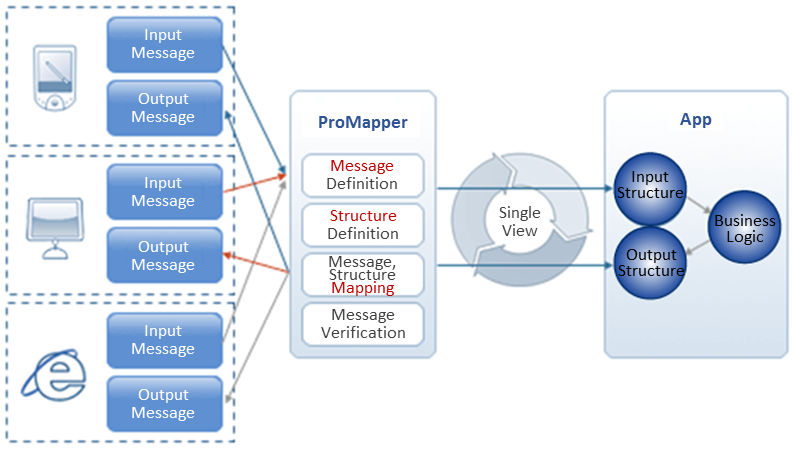
If a developer defines input and output messages to be used in the service under development by using the ProMapper Editor of Studio, ProMapper generates and converts C structures and C source. If the the service is called through various channels, ProMapper converts the messages of the channel to an input structure of the service. If the service puts an output value in the output structure, ProMapper generates an output message and returns it to the channel.
ProMapper manages information about conversion between structures and messages required to define service and module input/output and supports source generation. It supports the following message types: FDL, FML, and Delimiter.
| Message Type | Description |
|---|---|
FLD (Fixed-Length-Data) |
|
FDL/FML(Field Definition Language) |
|
Delimiter |
|
5. DBIO
To increase development productivity for data processing, a layer that guarantees the independence and performance of database access is required. ProFrame provides DBIO modules for database access integration and DWIO modules for data transfer with systems to integrate, which allows to develop applications independent from database management system.
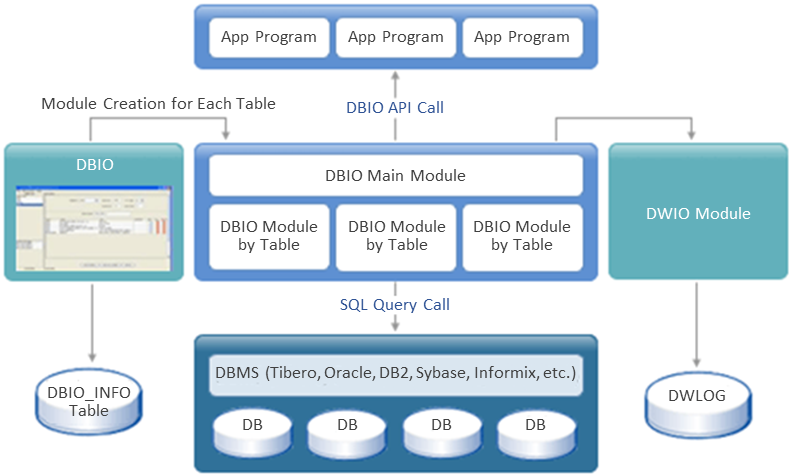
DBIO standardizes and manages database access methods to prevent duplicate SQL programming. It provides high development productivity and easy maintenance by integrating database accesses.
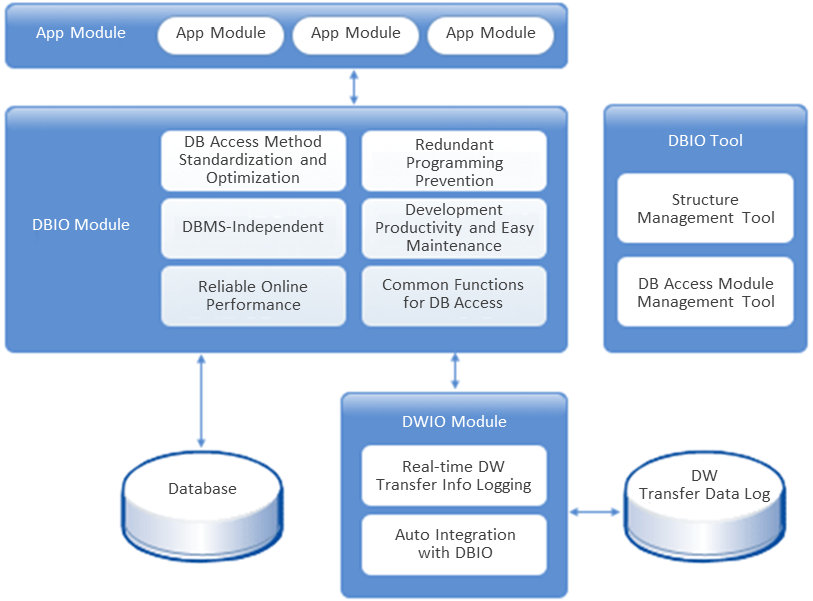
The following describes each function of DBIO Editor.
| Function | Description |
|---|---|
SQL management |
Saves all the developed SQL changes and manages their configuration. |
Runtime privilege management |
Manages developed SQL so that it is not applied to a system at runtime without DBA approval. |
SQL action prediction |
Monitors execution plan information of developed SQL. |
CRUD monitoring creation |
Monitors accesses between programs and tables for each CRUD. |
Developer privilege management |
Manages privileges for each group to edit developed SQL. It manages DBA privilege for join and sub queries. It also manages approvals when sending SQL to another developer. |
Developer can define database access logic by using DBIO Editor. Since ProFrame automatically generates source, development productivity can be improved.
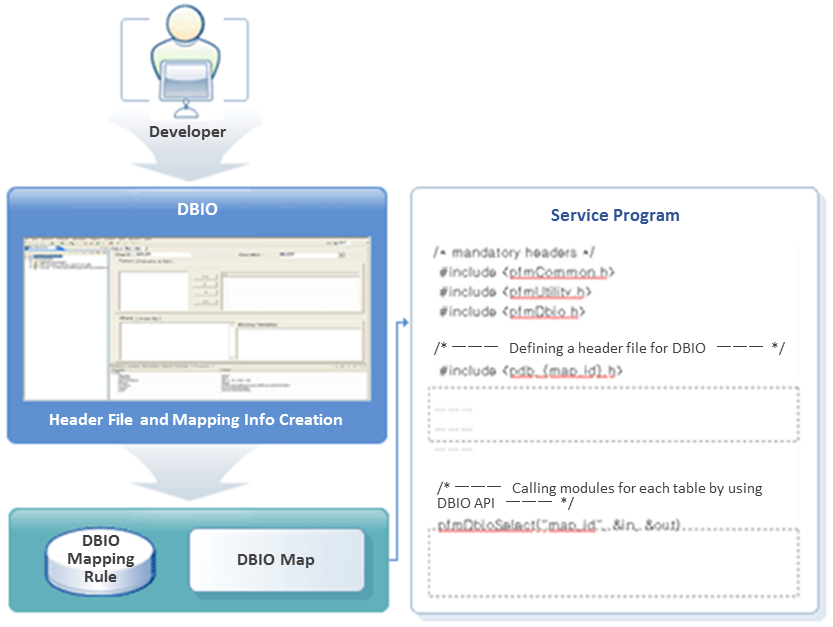
That is, SQL written in the DBIO Editor can be created as simple Exec SQL source by Source Generator. It also can be compiled, deployed, and executed by a developer’s simple command.
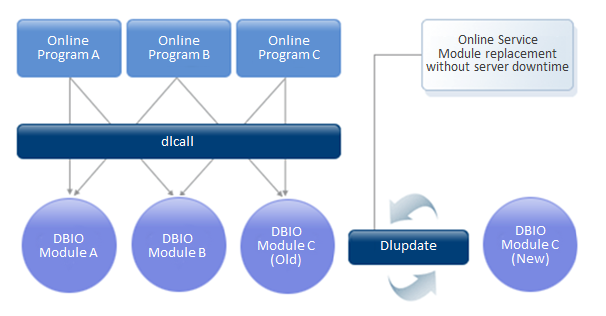
When table data or database access logic is changed, DBIO immediately applies the change without service downtime. For this, ProFrame provides hot deploy that enables to dynamically apply changed DBIO modules in real time.
ProFrame’s DBIO creates various types of SQL and a module’s meta data by selecting table and column data, and uses them to create a DBIO module. Developers can refer to the design and implementation of individual queries based on the previously developed SQL Query Pool whose quality has been verified. It is possible to predict and prevent problems that can occur at runtime in advance by referring to execution plan information through SQL query simulation before applying it to an application module.
It also provides functions required to create and test SQL such as SQL Testing and Execution Plan View and supports the integrated development environment and integrated functions for repository-based privilege and version management and impact analysis.