Linking Services
This chapter describes the basic concept of service link and how to implement each service link.
1. Overview
Service link refers to a combination of services in a way that mutual calls are made between different services. Such service link can be divided into several types according to classification criteria.
The types of service link are as follows:
| Classification | Service link type |
|---|---|
Order |
|
Number |
|
Location |
|
Among the above service links, ProFrame supports only 3 service links.
-
Prompt link
-
1:1 link
-
Internal link
Internal link means a transaction that is made by combining individual transactions through calls between service modules within the core. The service that performs this internal link communicates using CommBuff, and can be executed by dividing it into core online internal link and core batch link.
The following describes internal link. Internal link uses CommBuff. To create a link between services, drag and drop an already created service module.
|
This guide describes the internal link among the services supported by ProFrame. |
The following is the supported method according to the link type of each module.
| Link Type | Supported method and description |
|---|---|
Service module→Business module |
DlCall method (calling business module with DlCall method) |
Service module↔Service module |
DlCall and TpCall methods |
Service module→Batch module |
DlCall and TpCall methods |
Batch module→Service module |
It is only through the module provided by ProFrame. |
2. Support Type by Service Link
The method of calling the service module is divided into DlCall method and TpCall method in ProFrame.
The following are the strength and weakness of the TpCall and DlCall methods.
| TpCall | DlCall | |
|---|---|---|
Strength |
|
|
Weakness |
There is a load on the system as it requires an IPC mechanism. |
|
Application Criteria |
Transactions that need to be separated into separate transactions
|
General linked transactions within the core
|
|
InterProcess Communication (IPC) refers to communication between individual processes to be executed simultaneously in one operating system. |
DlCall and TpCall each have a set of supported transaction types. When creating an connecting transaction, you should decide which method to use by considering the strength and weakness of the two types of supported transaction types.
The following describes the DlCall and TpCall methods.
-
DlCall
DlCall is a method of connection by directly calling the linked module. It does not support Async mode, and DlCall can be used only for 1-Tx of Sync mode.
Async is a mode that handles the process of the linking operation without waiting for a response after requesting the linked service from the linking one, and Async Reply sets to receive a response after requesting the linked service from the linking one and wait until to receive a response.
Sync Async (Async No Reply Method) 1-Tx
Available
Unavailable
N-Tx
Unavailable
Unavailable
1-Tx processes the linking operation and the linked service as one transaction, and N-Tx processes the linking operation and the linked service separately.
-
TpCall
In the TpCall method, 1-Tx and N-Tx methods can be used when using the Sync mode. However, in the case of the 1-Tx method, since the linking method that directly calls the module has a fast performance advantage, in the case of the 1-Tx method of the Sync mode, it is recommended to connect using DlCall.
Additionally, only the N-Tx method can be used in the Async mode.
Sync Async(Async No Reply Method) 1-Tx
Available
(Due to performance issues, it is recommended to use DlCall.)
Unavailable
N-Tx
Available
Available
Sync is a mode that waits until a response is received after requesting a service to be linked in the linking operation, and Async No Reply does not wait for a response from the linked one.
3. Implementation of Service Link
To implement service link, add other service modules by dragging and dropping them with the mouse in EMB Designer that includes service modules. At this time, the service link is implemented by modifying the Call Property among the properties of the added service module.
3.1. Call Property
The properties for service link can be set in the properties view of the studio. If you select the service module added here, the Call Property property as shown in the figure below appears in the properties view.
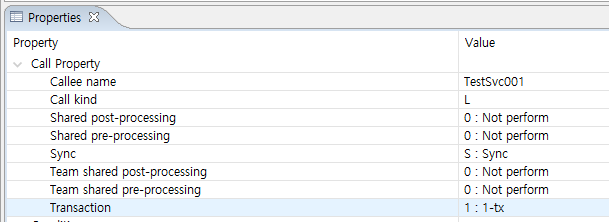
Following describes the Call Property.
| Property | Description |
|---|---|
Callee name |
Automatically sets when dragging and dropping the service module with the link module name. |
Call Kind |
Sets the link type. Sets whether to select DlCall method or TpCall method for service connection. For example, in the case of the DlCall method, only 1-Tx and Sync processing is available.
'Call Kind' is a property that determines whether to perform DlCall or TP-Monitor service call-based TpCall for the link module. In general, it is set to DlCall to perform module call for internal link, but in other special cases, it is also set to TpCall.
|
Shared pre-processing |
Sets whether to perform system pre-processing as a linked operation.
|
Shared post-processing |
Sets whether to perform system post-processing as a linked operation.
|
Sync |
In case of invoking a linked operation in Sync mode, the linking operation service waits until the linked one is returned. In case of invoking a linked operation in the Async mode, the logic of the linking operation is continuously executed immediately after invoking the linked one in the linking operation.
|
Team shared pre-processing |
Sets whether or not to perform pre-processing of tasks as a linked operation.
|
Team shared post-processing |
Sets whether or not to perform post-processing of tasks as a linked operation.
|
Transaction |
Sets the transaction processing category.
|
3.2. Linking Method of DlCall
The default setting value of internal linking call property is used for call property setting. When using the DlCall method, only Sync/1-Tx processing is possible for link settings.
Invoking Connected Operation Service Module with DlCall
In the case of invoking the linked service module with DlCall, the EMB module creation for the module for performing the linking operation and the linked operation must be completed.
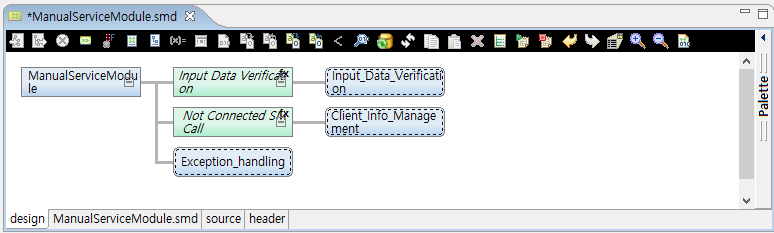
The following is a source example that calls DlCall for a service module to be linked.
static long InnerModule2(ManualServiceModuleContext *context)
{
    long rc = RC_NRM;

    // User Variables Declaration

    {
        /**************************************
         * KIND     : Service Module Call
         * NODE ID  : 5
         * NAME     :
         * DESCRIPTION :
         *************************************/
①      PfmLinkHeader linkHeader = { "CustomerInfoManagerment",
              "CustomerInfoManagerment", "PFM4", 'L', 0, 0, 0, 0, '1', 'S'};
        STR1_IN temporaryInput;
        STR1_OUT temporaryOutput;

        bzero(&temporaryInput, sizeof(STR1_IN));
        bzero(&temporaryOutput, sizeof(STR1_OUT));
        //DO_NOT_MODIFY_THIS_LINE-----------START_OF_CODE:BEFORE_CODE NODEID5------------------//
②      context->inCtxCustomerInfoManagerment.empno = INPUT->empno;//empno = empno
        //DO_NOT_MODIFY_THIS_LINE-----------END_OF_CODE:BEFORE_CODE NODEID5------------------//

        /**************************************
         *   KIND        : Service Module Callee Info
         *   NAME        : true
         *   INPUT       : STR1_IN
         *   OUTPUT      : STR1_OUT
         *************************************/
③      PFM_TRY(pfmServiceModuleCall(&temporaryInput, &temporaryOutput, &linkHeader, sizeof(STR1_IN), sizeof(STR1_OUT)));
        //DO_NOT_MODIFY_THIS_LINE-----------START_OF_CODE:SERVICE_MODULE_EXCEPTION NODEID5------------------//

        //DO_NOT_MODIFY_THIS_LINE-----------END_OF_CODE:SERVICE_MODULE_EXCEPTION NODEID5------------------//

        //DO_NOT_MODIFY_THIS_LINE-----------START_OF_CODE:AFTER_CODE NODEID5------------------//
④      OUTPUT->empno = context->outCtxCustomerInfoManagerment.empno;//empno = empno
        //DO_NOT_MODIFY_THIS_LINE-----------END_OF_CODE:AFTER_CODE NODEID5------------------//
    }
    return RC_NRM;

PFM_CATCH:
    return rc;
}
The following is a description of each number among the above sources.
① Link Header option according to Call Property setting.
| Call Property | Option value |
|---|---|
Callee name |
"CustomerInfoManagerment" |
Transaction Code |
"CustomerInfoManagerment" |
Inst Number |
"PFM4" |
Call Kind |
'L' |
Shared Pre-Processing |
0 |
Shared Post-Processing |
0 |
Team Shared Pre-Processing |
0 |
Team Shared Post-Processing |
0 |
Transaction Type |
‘1’ |
Sync Type |
‘S’ |
② Map the input structure.
③ Call the service module.
④ Map the output structure.
3.3. Linking Method of TpCall
This section describes the case of calling the linked service module with TpCall.
Most of service links can be connected by dragging and dropping the linked module to the EMB module of the linking module without setting the call property. However, since service link using DlCall cannot process transactions separately, some of the internal link uses the TpCall method by calling the linked module.
If the TpCall method is used, asynchronous processing between the linking module and the linked module is possible, and it is also possible to process the transaction separately by setting the values of 'Call Kind', 'Sync Type', and 'Transaction Type' of Call Property.
The TpCall method is used when calling a link service that requires a transaction to be separated. A module for linking and linked processing must be created in EMB Designer. In addition, most of the internal link process is the same as the general case of internal link, but there is a difference only in the setting of call properties.
After setting the module for setting the internal link type in EMB Designer, if you check the [Properties] view in ProFrame Studio, the Call Property that allows you to set the internal link type is displayed.
The following describes how to process 1-Tx or N-Tx for each Sync and Async mode using the TpCall method when the linked operation is a service module.
-
Sync
Processing Method Description 1-Tx
If TpCall is used for Sync mode and 1-Tx processing, the performance of TpCall, which performs TP-Monitor service-based calls, is lowered compared to DlCall that directly calls the module, so the Sync/1-Tx method is used and it is recommended to use DlCall.
N-Tx
Transactions are processed separately, and link processing is performed in a synchronous processing method. For details, refer to "Sync : N-Tx Processing Method".
-
Async
Processing Method Description No Reply/1-Tx
It is a structure that cannot be used.
No Reply/N-Tx
In this method, asynchronous processing is performed and the transaction of the linking and linked modules is separated and performed without waiting for a response from the linked module. For details, refer to "Async : No Reply/N-Tx Processing Method".
Sync : N-Tx Processing Method
Transactions are processed separately, and link processing is performed in a synchronous processing method. The linking module and the linked module are processed as different transactions, and the log about the linking and linked processing is left in the TP-Monitor server to which they belong.
The following is a description of TpCall/Sync/N-Tx processing.
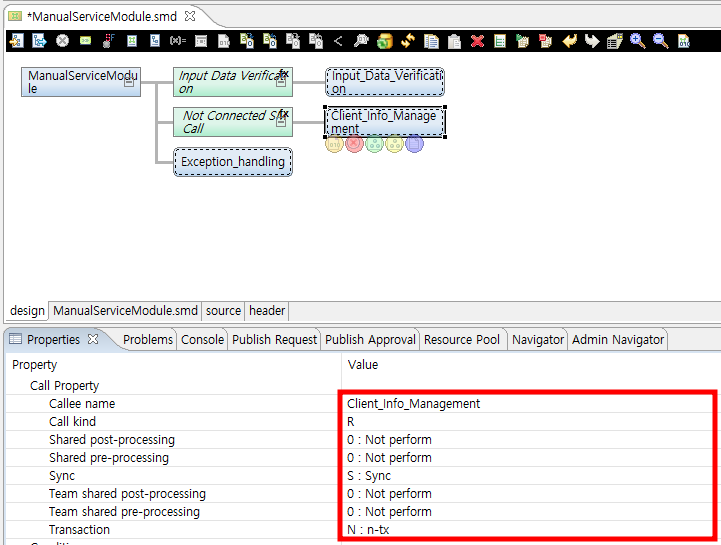
The following is a source example of the service module for TpCall/Sync/N-Tx processing.
static long InnerModule2(ManualServiceModuleContext *context)
{
    long rc = RC_NRM;

    // User Variables Declaration

    {
        /**************************************
         * KIND     : Service Module Call
         * NODE ID  : 5
         * NAME     :
         * DESCRIPTION :
         *************************************/
①      PfmLinkHeader linkHeader = { "CustomerInfoManagerment",
                 "CustomerInfoManagerment", "PFM4", 'R', 0, 0, 0, 0, 'N', 'S'};
        STR1_IN temporaryInput;
        STR1_OUT temporaryOutput;

        bzero(&temporaryInput, sizeof(STR1_IN));
        bzero(&temporaryOutput, sizeof(STR1_OUT));
        //DO_NOT_MODIFY_THIS_LINE-----------START_OF_CODE:BEFORE_CODE NODEID5------------------//
②      context->inCtxCustomerInfoManagerment.empno = INPUT->empno;//empno = empno
        //DO_NOT_MODIFY_THIS_LINE-----------END_OF_CODE:BEFORE_CODE NODEID5------------------//

        /**************************************
         *   KIND        : Service Module Callee Info
         *   NAME        : true
         *   INPUT       : STR1_IN
         *   OUTPUT      : STR1_OUT
         *************************************/
③      PFM_TRY(pfmServiceModuleCall(&temporaryInput, &temporaryOutput, &linkHeader, sizeof(STR1_IN), sizeof(STR1_OUT)));
        //DO_NOT_MODIFY_THIS_LINE-----------START_OF_CODE:SERVICE_MODULE_EXCEPTION NODEID5------------------//

        //DO_NOT_MODIFY_THIS_LINE-----------END_OF_CODE:SERVICE_MODULE_EXCEPTION NODEID5------------------//

        //DO_NOT_MODIFY_THIS_LINE-----------START_OF_CODE:AFTER_CODE NODEID5------------------//
④      OUTPUT->empno = context->outCtxCustomerInfoManagerment.empno;//empno = empno
        //DO_NOT_MODIFY_THIS_LINE-----------END_OF_CODE:AFTER_CODE NODEID5------------------//
    }
    return RC_NRM;

PFM_CATCH:
    return rc;
}
The following is a description of each number among the above sources.
① Link Header option according to Call Property setting.
| Call Property | Option value |
|---|---|
Callee name |
"CustomerInfoManagerment" |
Transaction Code |
"CustomerInfoManagerment" |
Inst Number |
"PFM4" |
Call Kind |
'R' |
Shared Pre-Processing |
0 |
Shared Post-Processing |
0 |
Team Shared Pre-Processing |
0 |
Team Shared Post-Processing |
0 |
Transaction Type |
‘N’ |
Sync Type |
‘S’ |
② Map the input structure.
③ Call the service module.
④ Map the output structure.
Async : No Reply/N-Tx Processing Method
An asynchronous processing is performed and the transaction of the linking and the linked modules is separated and performed without waiting for a response from the linked module.
The following is a description of TpCall/Async-No Reply/N-Tx processing.
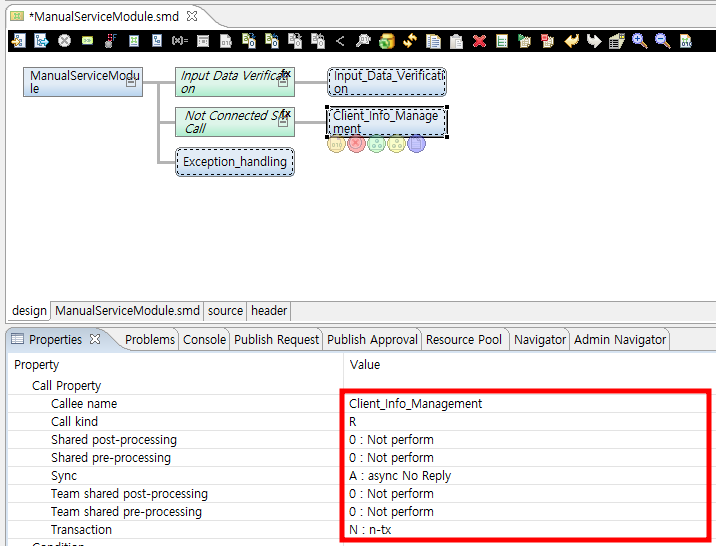
The following is a source example of the service module for TpCall/Async-No Reply/N-Tx processing.
static long InnerModule2(ManualServiceModuleContext *context)
{
    long rc = RC_NRM;

    // User Variables Declaration

    {
        /**************************************
         * KIND     : Service Module Call
         * NODE ID  : 5
         * NAME     :
         * DESCRIPTION :
         *************************************/
①      PfmLinkHeader linkHeader = { "CustomerInfoManagerment",
                  "CustomerInfoManagerment", "PFM4", 'R', 0, 0, 0, 0, 'N', 'A'};
        STR1_IN temporaryInput;
        STR1_OUT temporaryOutput;

        bzero(&temporaryInput, sizeof(STR1_IN));
        bzero(&temporaryOutput, sizeof(STR1_OUT));
        //DO_NOT_MODIFY_THIS_LINE-----------START_OF_CODE:BEFORE_CODE NODEID5------------------//
②      context->inCtxCustomerInfoManagerment.empno = INPUT->empno;//empno = empno
        //DO_NOT_MODIFY_THIS_LINE-----------END_OF_CODE:BEFORE_CODE NODEID5------------------//

        /**************************************
         *   KIND        : Service Module Callee Info
         *   NAME        : true
         *   INPUT       : STR1_IN
         *   OUTPUT      : STR1_OUT
         *************************************/
③      PFM_TRY(pfmServiceModuleCall(&temporaryInput, &temporaryOutput, &linkHeader, sizeof(STR1_IN), sizeof(STR1_OUT)));
        //DO_NOT_MODIFY_THIS_LINE-----------START_OF_CODE:SERVICE_MODULE_EXCEPTION NODEID5------------------//

        //DO_NOT_MODIFY_THIS_LINE-----------END_OF_CODE:SERVICE_MODULE_EXCEPTION NODEID5------------------//

        //DO_NOT_MODIFY_THIS_LINE-----------START_OF_CODE:AFTER_CODE NODEID5------------------//
④      OUTPUT->empno = context->outCtxCustomerInfoManagerment.empno;//empno = empno
        //DO_NOT_MODIFY_THIS_LINE-----------END_OF_CODE:AFTER_CODE NODEID5------------------//

    }
    return RC_NRM;

PFM_CATCH:
    return rc;
}
The following is a description of each number among the above sources.
① Link Header option according to Call Property setting.
| Call Property | Option Value |
|---|---|
Callee name |
"CustomerInfoManagerment" |
Transaction Code |
"CustomerInfoManagerment" |
Inst Number |
"PFM4" |
Call Kind |
'R' |
Shared Pre-Processing |
0 |
Shared Post-Processing |
0 |
Team Shared Pre-Processing |
0 |
Team Shared Post-Processing |
0 |
Transaction Type |
‘N’ |
Sync Type |
‘A’ |
② Map the input structure.
③ Call the service module.
④ Map the output structure.
3.4. Transferring CommBuff Data of Internal Link
When performing internal link between services or service modules within the core, data transfer between linking and linked modules occurs through CommBuff.
CommBuff is largely divided into a framework area and a work area.
-
Framework Area
In case of link with an area where delivery between services is possible, it is delivered to the service inside the core by the framework area.
-
Work Area
It is an area where work can be shared. However, it is not transmitted to other online tasks.
The following describes the composition of CommBuff Slot.
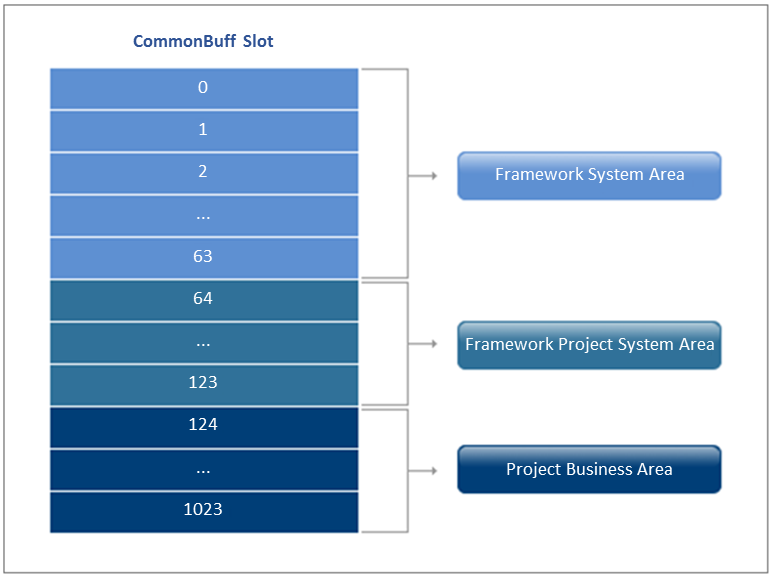
-
Framework System Area
As a space used internally in the framework system, it has the same items regardless of the project.
-
Framework Project System Area
It is used internally in the framework system and is modified and used according to the project requirements.
-
Project Business Area
It is assigned and used by the work team according to the project work requirements.
In the CommBuff Slot configuration of CommBuff Slot Composition, from 0 to 123, the framework delivers data to the area where data is delivered through CommBuff between internal link. For the shared area within the task, data transfer is performed using the macro defined by assembling the contents of the CommBuff Slot between the tasks.
When performing internal link, data transfer using CommBuff between linking and linked modules is performed in the order shown in the figure below.
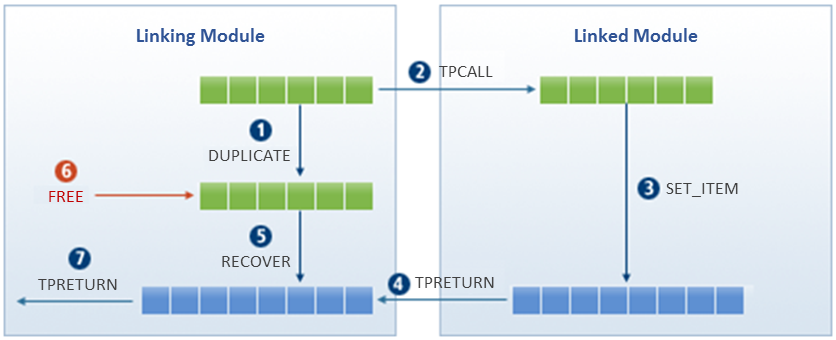
The following describes the figure above.
- ① DUPLICATE
-
Duplicates the CommBuff of the main character.
- ② TPCALL
-
Delivers the replicated CommBuff data while calling the linked service.
- ③ SET_ITEM
-
Changes the CommBuff data received from the linked service.
- ④ TPRETURN
-
Returns the changed CommBuff to the linking service as a result value.
- ⑤ RECOVER
-
Restores the CommBuff data changed by the linked service to the CommBuff before duplication.
- ⑥ FREE
-
Releases the duplicated CommBuff in ①.
- ⑦ TPRETURN
-
Sends the final result value to the client computer.
|
If CommBuff is not released, memory shortage occurs. Therefore, the linking module must perform CommBuff release. |
4. Precautions in Implementing Service Connection
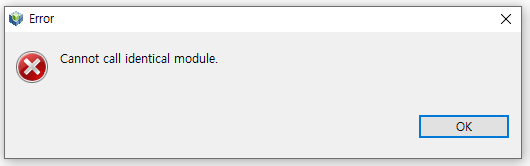
A service module can call any module including other service modules. Also, resource modules that can be created in ProFrame such as DBIO can be called. Note that it is unavailable to call the identical module and this may lead to an infinite loop.
4.1. Use of CommBuff
Service module can use CommBuff unlike other modules of business module. However, the pre-processing module and the post-processing module can use CommBuff.
-
CommBuff information of service module

-
CommBuff information of pre-processing module (Undefined)

-
Other modules - No CommBuff information

4.2. Constraints in Use of CommBuff Items
Do not change the CommBuff item used internally by the framework to prevent the problem of stability and consistency in the framework.
For the main items of CommBuff mentioned in the table below, the developer should not directly change it, and if it is necessary to change it, use the API provided by ProFrame.
| CommBuff Item | Usage | Change |
|---|---|---|
PFM_HDR_EXT |
ProFrame standard message header content |
Available |
PFM_LOGHEAD |
Business log header |
Available |
PFM_VAR_SHARE |
Internal data of the framework |
Unavailable |
PFM_SVCPARAM |
Service parameter |
Unavailable |
4.3. EMB Module Design
The online program has the basic structure of initial processing, input verification, main processing, termination processing, and exception processing.
In the second level, exception handling can be processed by VM if the contents are simple.
The following is an example of a basic template design.
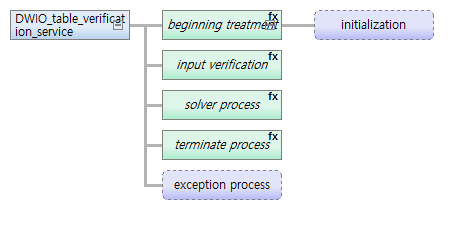
When designing an EMB module, consider the following.
-
Design within 5 levels.
-
Create in the form of initial processing, input verification, termination processing, and exception processing.
-
Even if there is no business logic, the form is maintained.
-
Exception handling implements logic that is executed when it is not normally terminated.
-
-
At 2nd level, place IM. (Exception handling is excluded.)
-
If the VM is divided into too small units, it may be difficult to understand the flow of the EMB module.
-
It is not recommended to list VMs consecutively.
-
Enter the logical names according to the characteristics of the module to increase visibility.
-
If the logical name is long, it is automatically wrapped by separating it with a space.
-
It is not recommended when the subnode of IM is only one VM.
-
Later, IM is set to 'function' and VM to 'block'.
-
Process logical branches as XOR.
-
Create the VM that is repeated inside the online program to VF.