Batch Job Information
This chapter describes the concept of batch job information,the characteristics of architecture, and how to create and check batch job information.
1. Overview
Batch Job Information is a part of the batch framework for checking the status of a batch in real time while performing a batch job. In the batch job, you have to rely on the return value to check the contents of the start and end of the batch job or the normality and error. However, ProFrame supports batch job information to overcome this limitation.
Batch Job Information provides the developer or batch manager with information such as the execution status and termination status of the batch and the location where the error occurred.
Basic Structure
Batch job information architecture provides TP service for database processing to categorize the database transactions according to batch execution. And the TP service enables to store information about the state in which batch is performed in the database.
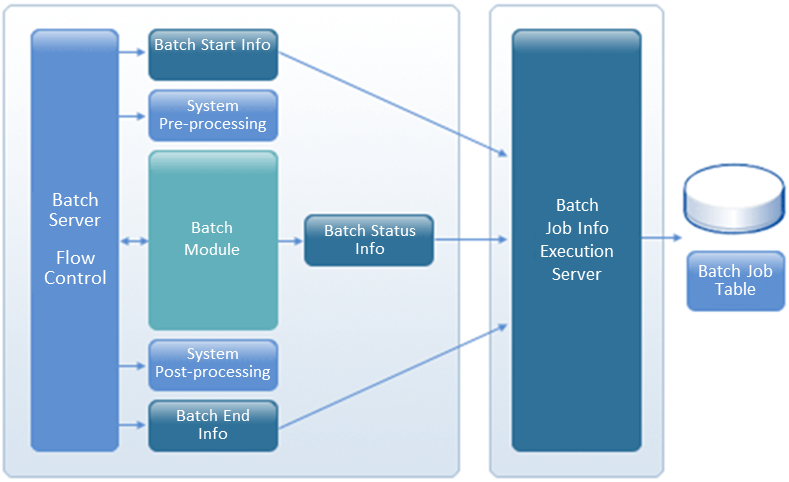
2. Creating Batch Job Information
Batch job information is recorded in the batch job information database table provided by the batch framework of ProFrame by default even if the developer does not record the execution status information of the batch module. The information recorded at this time is batch start information and batch end information.
In addition to the information basically provided by ProFrame, the developer can record the status information of the currently executing batch module by using the API provided by the batch job information.
2.1. Batch Job Information API
pfmBatchSuccessJobInf
pfmBatchSuccessJobInfo is an API that updates success information about batch execution.
pfmBatchSuccessJobInfo ( PfmBatchSuccessJobTable * );
The following is an example of creating pfmBatchSuccessJobInfo API.
context->Count = 0;             /* Initializing the number of processed variables */
PFM_TRYNJ( pfmDbioAmend() )     /* DBIO module Call */
if( rc != RC_NRM )
{
    return rc;  /* Error processing */
}
context->Count = PDB_RECNUM;          /* Setting the number of processed cases */

PfmBatchSuccessJobTable batchJobTable;

bzero( &batchJobTable, sizeof(PfmBatchSuccessJobTable) )
strncpy( batchJobTable.job_last_key, "DB data processing", LEN_TABLE_PFM_BATCH_JOB_LAST_KEY );
chJobTable. job_nrm_cnt = context->Count ;
strncpy( batchJobTable.job_nrm_ctnt, "Normal processing", LEN_TABLE_PFM_BATCH_JOB_JOB_NRM_CTNT);

pfmBatchCreateJobInfo( &batchJobTable );      /* Success information update */
PFM_TRY( pfmBatchDBCommit() );                /* DB transaction commit */
pfmBatchErrorJobInfo
pfmBatchErrorJobInfo is an API that updates error information about batch execution.
pfmBatchErrorJobInfo ( PfmBatchSuccessJobTable * );
The following is an example of creating pfmBatchErrorJobInfo API.
PFM_TRYNJ( pfmDbioAmendArray() )                /* DBIO module call */
if( rc != RC_NRM )
{
    context->JobErrCode = pfmDbioGetErrorNo();     /* Erro code setting */
    STRCPY(context->ErrMsg, pfmDbioGetErrorString()); /* Error message setting */
    return rc;
}
…...
/* Error handling function */
char JobErrCode[32 + 1];

/* Initializing error code string variable */
bzero(lsvJobErrCode, sizeof(JobErrCode));

/* Converting the error code to string */
pfmStringGetFromLongN(JobErrCode, context->JobErrCode, 8);

PfmBatchErrorJobTable batchJobTable;
bzero( &batchJobTable, sizeof(PfmBatchErrorJobTable) )
strncpy( batchJobTable.job_last_key, "DB data processing", LEN_TABLE_PFM_BATCH_JOB_LAST_KEY );
strncpy( batchJobTable.job_err_code, JobErrCode, LEN_TABLE_PFM_BATCH_JOB_JOB_ERR_CODE);

batchJobTable.job_err_cnt= context-> JobErrCode;
strncpy( batchJobTable.job_err_ctnt, context->ErrMsg, LEN_TABLE_PFM_BATCH_JOB_JOB_ERR_CTNT );

pfmBatchErrorJobInfo( &batchJobTable );   /* Updating error information */
PFM_TRY(pfmBatchDBRollback());            /* DB Transaction Rollback */
2.2. Creating Batch Job Information with API
Batch job information is created using the API provided by batch job information inside the batch module.
The following is an example of creating batch job information in EMB Designer.
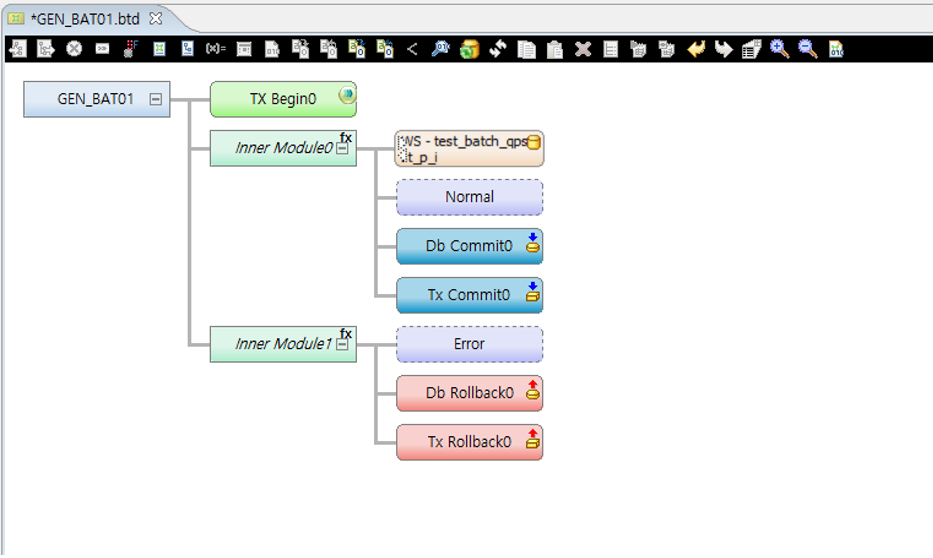
Batch job information is created using API so that normal or error processing can be performed according to the input value of the general batch module.
-
Inner module coding example for batch job information testing
if(context->input->batch01==01) { /************************************** * KIND : Intermediary Module Function Call * NODE ID : 2 * NAME : Inner Module0 * DESCRIPTION : * *************************************/ PFM_TRY(innerModule2(context)); } else { … } -
Example of normal virtual module coding
PfmBatchSuccessJobTable pfmBatchSuccessJobTable;
strcpy( pfmBatchSuccessJobTable.job_last_key, "100" );
pfmBatchSuccessJobTable.job_nrm_cnt = 30;
strcpy( pfmBatchSuccessJobTable.job_nrm_ctnt, "Successfully processed. " );
PFM_TRYNJ(pfmBatchSuccessJobInfo( &pfmBatchSuccessJobTable ) );
-
Example of error virtual module coding
PfmBatchErrorJobTable pfmBatchErrorJobTable;
strcpy( pfmBatchErrorJobTable.job_last_key, "100" );
strcpy( pfmBatchErrorJobTable.job_err_code, "ERRR01" );
pfmBatchErrorJobTable.job_err_cnt = 70;
strcpy( pfmBatchErrorJobTable.job_err_ctnt, "Error occurred. " );
PFM_TRYNJ(pfmBatchErrorJobInfo( &pfmBatchErrorJobTable ));
The following is an example of executing a general batch module using the batch job information created through the examples above.
[pfmtpqa@fwsol:/home2/pfmtpqa/proframe5.0]$ ./GENBATCH01 -c 'GEN_BAT01' -d 'GEN;01;TEST;'

[pfmtpqa@fwsol:/home2/pfmtpqa/proframe5.0]$ ./GENBATCH01 -c 'GEN_BAT01' -d 'GEN;02;TEST;'
The following is an example of checking the batch execution result.
Select
 BAT_CODE,
 JOB_NRM_CNT,
 JOB_ERR_CNT,
 JOB_ERR_CODE,
 JOB_NRM_CTNT,
 JOB_ERR_CTNT
From PFM_BATCH_JOB

2.3. Checking for Batch Job Information Creation
To check the created batch job information, you can retrieve a specific table in the database. Search for the PFM_BATCH_JOB table to check whether the batch execution status information is normally recorded.
If it is not recorded normally, check the following two information.
-
Check if the server that inserts batch job information into the database table works normally.
Description Server name
TPFMADM03
Service name
PFMADMSVC31
-
Check if the value of “JOB_INFO_FLAG” is set to “1” in the batch parameter table. You can check whether the batch job information works with the batch parameter, and if it is set not to work, you can test by changing the batch parameter value.