Development Tools
This chapter describes development tools provided by ProFrame.
1. Studio
Studio provides an Eclipse-based integrated development environment for ProFrame-based application development. It enables to easily develop online service, batch service, and module service programs by offering template source code. It also provides an environment where developers can easily register and debug programs with the compilation, debugging, and hot deploy functions.
The following are Studio’s characteristics.
-
Integrated development environment
-
Standard input/output variables based on property meta information
-
Easy development of various applications
-
Easy development of service and application modules by using developed resources and EMB
-
Separation of application code from complex system service code, which allows developers to focus on only service development
-
Development of various applications: online, batch, and application module programs
-
Easy debugging because errors can be easily found and modified by using GDB debugging
-
Easy deployment of services with the source deploy function
-
Easy integrations of services through EMB Designer
Studio has the following development components described in Development Components.
| Component | Description |
|---|---|
ProMapper Editor |
Adds information about structures and messages and their conversion. |
DBIO Editor |
Adds SQLs. |
EMB Designer |
Designs service and module flows. |
2. Test Framework
Test Framework is a tool that tests developed service and business modules. It visualizes modules' structures and fields and shows the result of entering and sending an actual value.
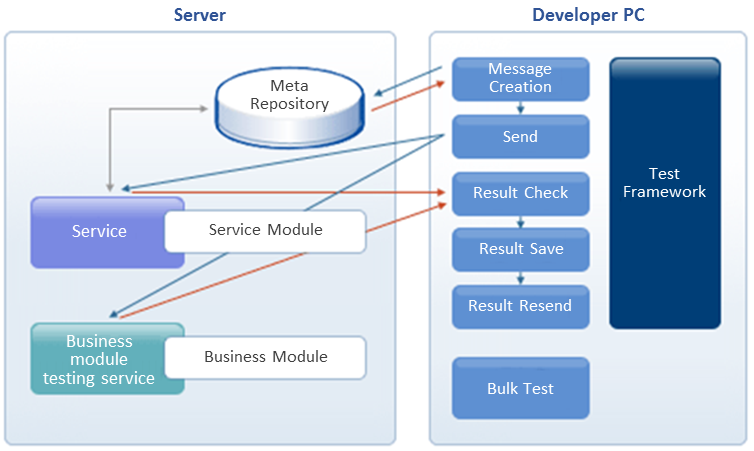
It stores test cases and tests the cases in batch to compare a current result with the stored cases' results. It also allows to perform a bulk test by using an Excel data file.
| Function | Description |
|---|---|
Unit test |
|
Test case management (Planned to support from Fix#2) |
|
Bulk test (Planned to support from Fix#2) |
|