ReleaseImage/WorkSpace
This chapter describes the basic concept of ReleaseImage/WorkSpace and how to develop it.
1. Overview
ReleaseImage/WorkSpace (RI/WS) separates and manages the RI area that manages resources in the same ways as in an operating environment and the WS area that can be newly created and modified.
The following are the benefits of RI/WS.
-
Can manage system to maintain the same resource environment even if existing resources are modified.
-
Minimizes the impact of resource modification by separating the development area.
-
Can selectively call Service, Business, DBIO, and FileIO module resources to the RI/WS area, which allows easily compare results before and after processing.
2. Developing RI/WS
The following is the flow of developing RI/WS.
-
New Creation Step (Checkout Step)
To develop a resource, newly create or check out a resource.
When checking out a resource, associated resources are checked out together. If one or more of the resource or associated resources are already checked out, an error occurred and a warning message is displayed.
-
Resource checkout
A resource in RI area repository is copied to WS area repository and becomes editable. The resource is locked, so that another developer cannot modify it.
-
Resource creation
A resource is created in WS area repository. The resource is locked, so that another developer cannot modify it.
The following shows associated resources.
Resource to Checkin/Checkout Associated Resource Service, Business, Batch, Pro-processing, and Post-processing modules
Input/output structure, input/output structure message
Structure
Message
DBIO
Input/output structure
DWIO target DBIO
Basic query for each type (Insert, Select, Update, Fetch, Delete), input/output structure
Message, mapping, shell, header, server resource
None
-
-
Development Step
Application logic can be developed with the same method as in development with an existing EMB. However, when calling a Service, Business, DBIO, or FileIO module, select RI/WS area resource for each through 'Properties - Module Target'. For information about how to create an EMB module, refer to Starting EMB.
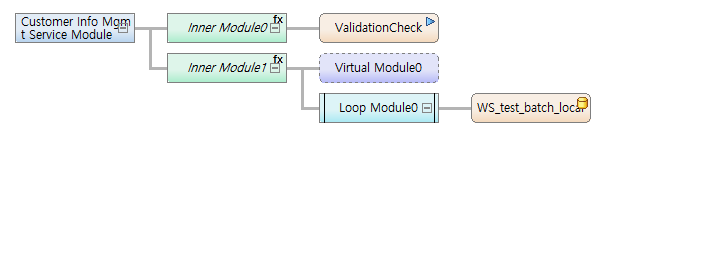 RI/WS Development Example (1)
When selecting a WS area, the name of a module to call starts with 'WS-' in EMB. You can select the RI/WS area as follows:
 RI/WS Development Example (2)
 -
Unit Test Step (WS Area)
Check whether the resource is modified normally. Use context menu of WS Navigator or a unit test icon in the WS resource EMB page.
If a selected resource is in the RI area, an RI resource of a TP server is called. It is in the WS area, a WS resource is called. After the first resource call, modules in the resource call RI or WS resources depending on Module Target set in the development step.
-
Checkin Step
Save the normally modified resource and associated resources in RI area repository.
-
Recreates source of the resource to check in and copies it to RI area repository. However, Call modules (Service, Business, DBIO, FileIO) in an EMB module to check in can refer to resources in RI area. Their 'Properties - Module Target' is automatically set to RI.
-
For resources copied to RI area repository, source is created and then compilation and Dlupdate are executed automatically.
-
Locks for the checked-in resources are released, the resources are removed from WS area, and source files and libraries are deleted.
-
-
Unit Test Step (RI Area)
Check whether the modified resource applies to RI area normally. Use context menu of RI Navigator or a unit test icon in the RI resource EMB page.
-
By performing a unit test on checked-in resources again, it can be checked whether the resources can operate normally in a production system.
-