Introduction
This chapter briefly introduces FileIO and describes its major functions and file formats.
1. Overview
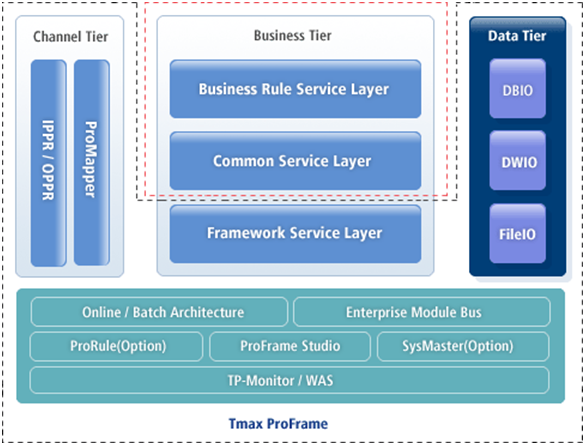
ProFrame provides standard database access to a business tier and supports standard input and output of specific files. FileIO is ProFrame’s standard method for reading and writing specific files. FileIO handles files in a structured format, makes them as a module, and allows easy access from an Enterprise Module Bus (EMB) module.
|
The data tier is one of the 3-tier ProFrame architecture. It separates database access modules from applications to improve business logic performance and guarantee database access consistency. It contains DBIO, DWIO, and FileIO. |
FileIO has the following characteristics.
-
Provides the standard file access method.
-
Provides consistent error handling for file access.
-
Allows batch processing for files in a structured format.
2. Major Functions
-
Reading and writing files
One row of a file can be converted into a structure. FileIO repeatedly accesses a file to read and write it by one row.
-
FileIO Compilation
FileIO uses ProMapper by default. FileIO repeatedly reads and writes a file by receiving a structure array and converting it to a message by structure unit for ProMapper.
When creating FileIO structures, source for ProMapper structures and the message type to convert are created. By compiling and executing Dlupdate on the source, It can be called and used in a FileIO module.
Inserting a FileIO module to the EMB Designer automatically creates source that calls FileIO API provided by ProFrame. Additionally entering FileIO information to the EMB Designer creates relevant structures in the EMB module source and passes them to FileIO API as input arguments.
That is, FileIO creates structures through conversion and repeatedly reads and writes a file.
3. File Formats
FileIO uses structured file formats and supports API for unstructured file formats.