Introduction
This chapter introduces DBIO and describes its major functions and query types.
1. Overview
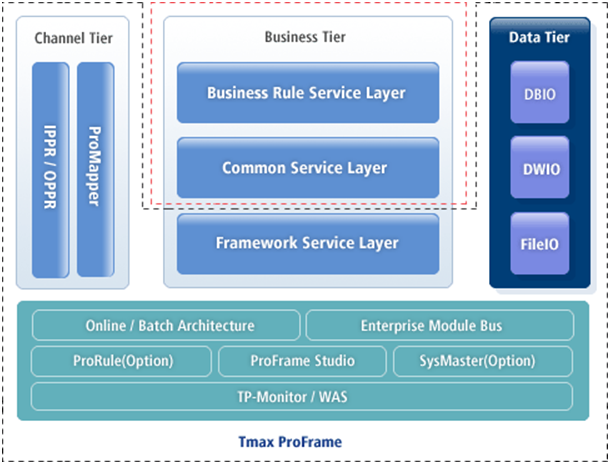
ProFrame provides standard business tier and input/output data and guarantees consistent database accesses and independent database management systems. DBIO in the data tier provides the standard for database accesses.
|
The data tier is one of the 3-tier ProFrame architecture. It separates database access modules from applications to improve business logic performance and guarantee database access consistency. It contains DBIO, DWIO, and FileIO. |
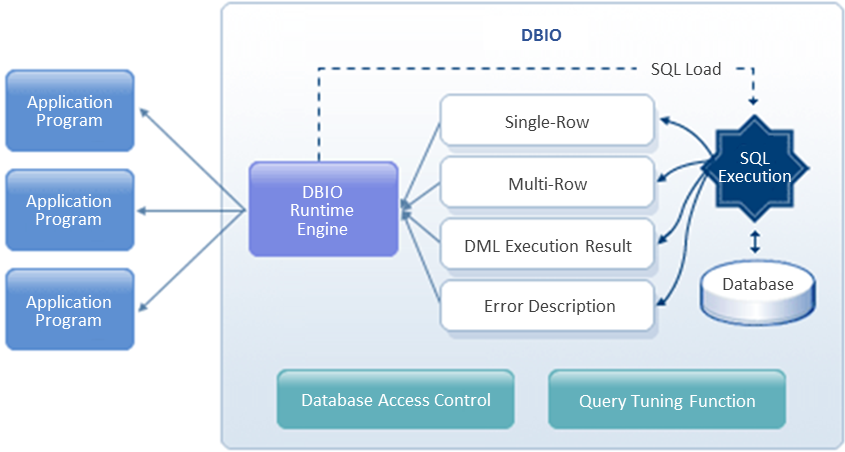
DBIO allows rapid application development and easy maintenance by providing standard database accesses. It also provides high productivity for the development of business logic related to database input/output and makes queries to execute into a module that can be called from an application by using API provided by ProFrame.
2. Characteristics
DBIO has the following characteristics.
-
Provides standard database accesses.
DBIO performs common functions for database accesses and controls the access permissions.
-
Supports consistent error handling for database accesses.
-
Removes DBMS vendor lock-in.
Since developers do not directly program embedded SQL, they can develop applications without depending on a specific DBMS vendor. Embedded SQL programming defines SQL statements within a database application.
-
Allows to develop high-quality applications.
DBIO automatically creates and manages query IDs and database input/output structures according to development standards. This allows high-quality application development and also means that applications are written in well-standardized code.
-
Minimizes redundant database programming.
-
Improves development productivity and reduces errors by using the DBIO editor.
-
Provides easy SQL management.
Since all SQL statements are saved and managed in DBIO, DBAs can query all SQL statements in use in a current system.
-
Supports the DWIO function.
DWIO is a DBIO function that sends changed database data to Data Warehouse (DW) in real time.
3. Major Functions
DBIO supports all embedded SQL of DBMSs such as Tibero, Oracle, Sybase, and DB2. This means that DBIO is created in the format of each vendor’s embedded SQL files and the files are precompiled to standard C files by using a precompiler.
DBIO provides the following SQL-related functions.
-
Executes INSERT, UPDATE, DELETE, SELECT, and FETCH on a single record.
-
Executes INSERT, UPDATE, DELETE, SELECT, and FETCH on multiple records.
-
Executes READ and WRITE on all columns.
-
Executes READ and WRITE on some columns.
-
Uses built-in group functions (SUM, COUNT, etc.) and stored functions.
-
Uses relational operators such as =, >, <, BETWEEN, LIKE, and IN.
-
Performs sorting by using ORDER BY or GROUP BY.
-
Uses the Lock option and cursor update for SELECT and FETCH.
-
Joins queries and subqueries.
-
Executes UNION, INTERSECT, and MINUS.
-
Executes dynamic SQL SELECT and FETCH.
|
DBIO does not support SQL that is not supported by a specific vendor or version such as the latest Pro*C. It also does not allow some DDL and DML statements that can cause a system security issue. To prevent this issue, it is better for DBAs to perform database tasks than for developers to do the tasks directly through applications. |
4. DBIO Query Types
SQL statements have one of the following two types: embedded and dynamic.
-
Embedded SQL
The query statement is not changed when executed, except for specified variable values.
-
Dynamic SQL
The query statement is changed when executed.
DBIO queries have one of the following four types. PERSIST, VIEW, and EXECSQL types are embedded SQL.
| Type | Description |
|---|---|
PERSIST |
Query for a single table. Developers do not need to manually enter a query, and they can create a query by using the DBIO editor of Studio (GUI). Used to execute INSERT, UPDATE, DELETE, SELECT, and FETCH queries on a single table. |
VIEW |
Query for multiple tables. Developers need to manually write a query. Used to execute SELECT and FETCH queries on multiple tables and to use JOIN and UNION statements, which are unavailable in the PERSIST type. |
EXECSQL |
Query for multiple tables. Developers need to manually write a query. Used to execute complex INSERT, UPDATE, and DELETE queries including INNER or other queries, which are unavailable in the PERSIST type. |
DYNAMICSQL |
Used when an SQL statement is changed when executed or to execute a query that is not supported by embedded SQL. This type allows to create a more flexible query rather than a query with a specific purpose. |