Server and Studio Uninstallation
This chapter describes how to uninstall ProFrame Server and Studio.
1. Server Uninstallation
The following are the steps for uninstalling ProFrame Server.
-
End JEUS and Tmax servers.
To end JEUS server, use the jdown command. To end Tmax server, use the tmdown command.
[pfmtpqa@fwsol:/home2/pfmtpqa]$ jdown fwsol down successful fwsol jeusexit successful [pfmtpqa@fwsol:/home2/pfmtpqa]$ tmdown Do you really want to down whole Tmax? (y : n): y TMDOWN for node(fwsol) is starting: TMDOWN: SERVER(tms_ora:0) downed: Mon Oct 06 11:00:19 2008 TMDOWN: SERVER(tms_ora:1) downed: Mon Oct 06 11:00:19 2008 TMDOWN: SERVER(TPFMADM02:39) downed: Mon Oct 06 11:00:19 2008 TMDOWN: SERVER(QPSTEST:41) downed: Mon Oct 06 11:00:19 2008 TMDOWN: SERVER(TPFMIPPR:36) downed: Mon Oct 06 11:00:19 2008 TMDOWN: SERVER(BONL02CN:37) downed: Mon Oct 06 11:00:19 2008 TMDOWN: SERVER(TPFMADM03:40) downed: Mon Oct 06 11:00:19 2008 TMDOWN: CLL downed: Mon Oct 06 11:00:19 2008 TMDOWN: TLM downed: Mon Oct 06 11:00:20 2008 TMDOWN: CLH downed: Mon Oct 06 11:00:20 2008 TMDOWN: TMM downed: Mon Oct 06 11:00:20 2008 TMDOWN: TMAX is down [pfmtpqa@fwsol:/home2/pfmtpqa]$ -
Delete TCache and apmmem.
-
Deleting TCache
pfmtcacheadmin –d
-
Deleting apmmem
apmmemadmin –d
[pfmtpqa@fwsol:/home2/pfmtpqa]$ pfmtcacheadmin -d
TCACHE ver. 2.3.6
This will delete TCACHE. Are you sure? [y/N] y
TCACHE deleted successfully.

[pfmtpqa@fwsol:/home2/pfmtpqa]$ apmmemadmin -d
APMMEM ver. 2.4.0
This will delete all APMMEM contents. Are you sure? [Y/N] y
APMMEM deleted.....

TRCBACKMEM deleted.....

EXTNMEM deleted.....

All APMMEM contents deleted successfully.
-
-
Delete the proframe5.0 directory.
[pfmtpqa@fwsol:/home2/pfmtpqa]$ ls -al
drwxr-xr-x   8 pfmtpqa  qa          1536 Oct 15  09:19 .
drwxr-xr-x   7 root     root         512 Jun 10  13:21 ..
drwxr-xr-x   7 pfmtpqa  qa           512 Oct  2  11:26 proframe5.0
-rw-rw-rw-   1 pfmtpqa  qa             6 Oct  6  10:08 ~

[pfmtpqa@fwsol:/home2/pfmtpqa]$ rm -rf proframe5.0
[pfmtpqa@fwsol:/home2/pfmtpqa]$ ls -al
drwxr-xr-x   8 pfmtpqa  qa          1536 Oct 15  09:19 .
drwxr-xr-x   7 root     root         512 Jun 10  13:21 ..
-rw-rw-rw-   1 pfmtpqa  qa             6 Oct  6  10:08 ~
-
If the Server is installed by using the installer, it can be uninstalled as follows.
[pfm5qa2@tmaxi7:/data2/pfm5qa2/proframe5.0/Uninstaller/ProFrame_C_5.0_Fix#1]$Uninstall_ProFrame_C_5.0_Fix1
Preparing CONSOLE Mode Installation...

===============================================================================
ProFrame_C_5.0_Fix#1             (created with InstallAnywhere by Macrovision)
-------------------------------------------------------------------------------


===============================================================================
Uninstall ProFrame_C_5.0_Fix#1
-------------------------------

About to uninstall...

ProFrame_C_5.0_Fix#1

This will remove features installed by InstallAnywhere.  It will not remove
files and folders created after the installation.

PRESS <ENTER> TO CONTINUE:


===============================================================================
Uninstalling...
---------------


...*
*
*************************
*************************
*************************
************************
...*
*
*************************
*************************
*************************
************************
...*
*
*************************
*************************
*************************
*************************


===============================================================================
Uninstall Complete
------------------

Some items could not be removed.

[pfm5qa2@tmaxi7:/data2/pfm5qa2/proframe5.0/Uninstaller/ProFrame_C_5.0_Fix#1]$
2. Studio Uninstallation
The following are the steps for uninstalling ProFrame Studio.
-
Select [Start] > [Programs] > [TmaxSoft] > [ProFrame Studio C 5.0] > [Fix 1] > [Uninstall].
-
Read the introduction and then click [Uninstall].
To cancel the uninstallation, click [Cancel] in any step.
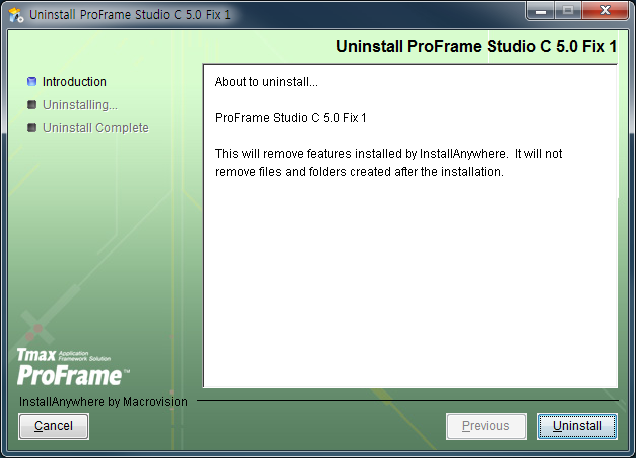 Uninstall ProFrame Studio – Introduction
 -
Studio-related files, directories, and registry data are deleted.
The progress bar shows the uninstallation status.
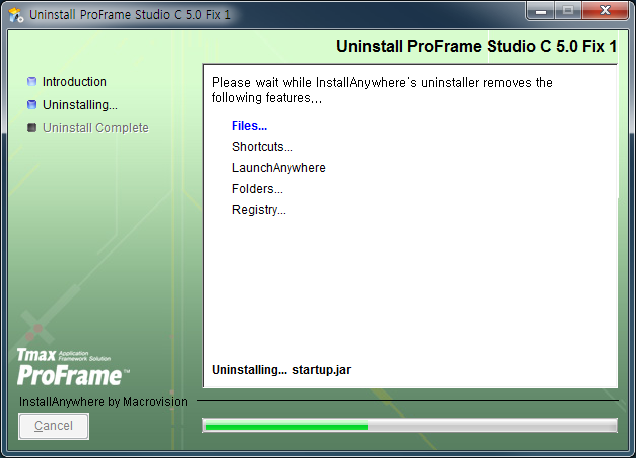 Uninstall ProFrame Studio – Uninstalling
 -
When Studio is uninstalled, the screen to ask whether to restart the system is displayed. To restart the system along with the uninstallation, select 'Yes, restart my system' and then click [Done]. To manually restart the system later, select 'No, I will restart my system myself' and then click [Done].
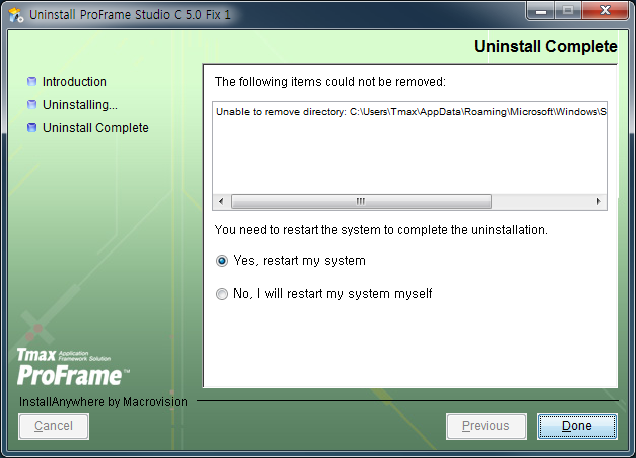 Uninstall ProFrame Studio – Uninstall Complete
 -
The shortcut is deleted from the desktop. The [TmaxSoft] > [ProFrame Studio C 5.0] > [Fix 1] menu is also deleted from [Start] > [Programs].